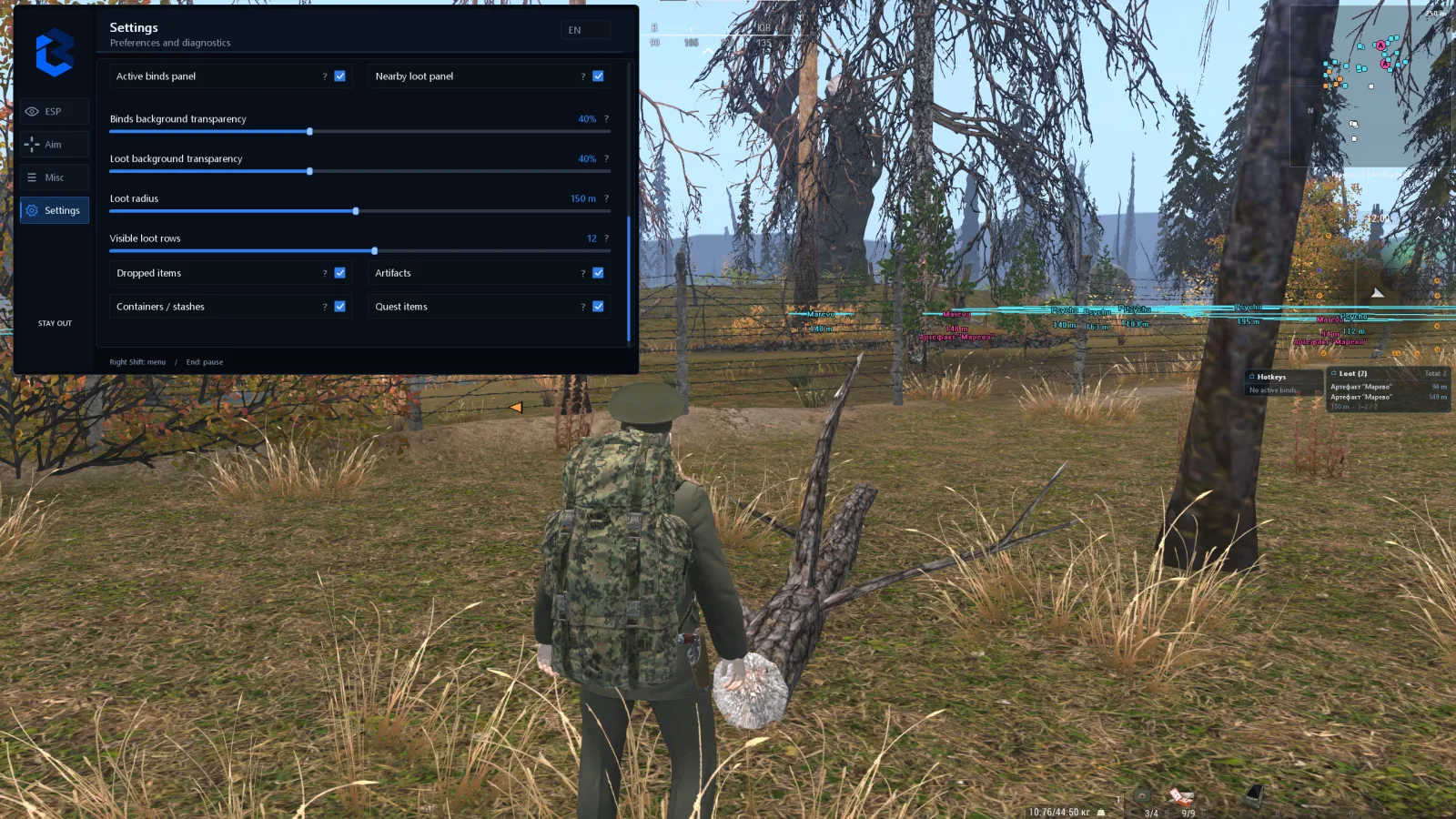
BURMALDA for Stay Out helps you stay in control of combat, item searching and exploring the area. Mark the targets you need, find loot by name, tell checked anomalies apart and tune aiming for players, NPCs or monsters. All features are combined in one interface: the set of markers, panels and parameters can be adjusted for a specific run.
The situation in front of you
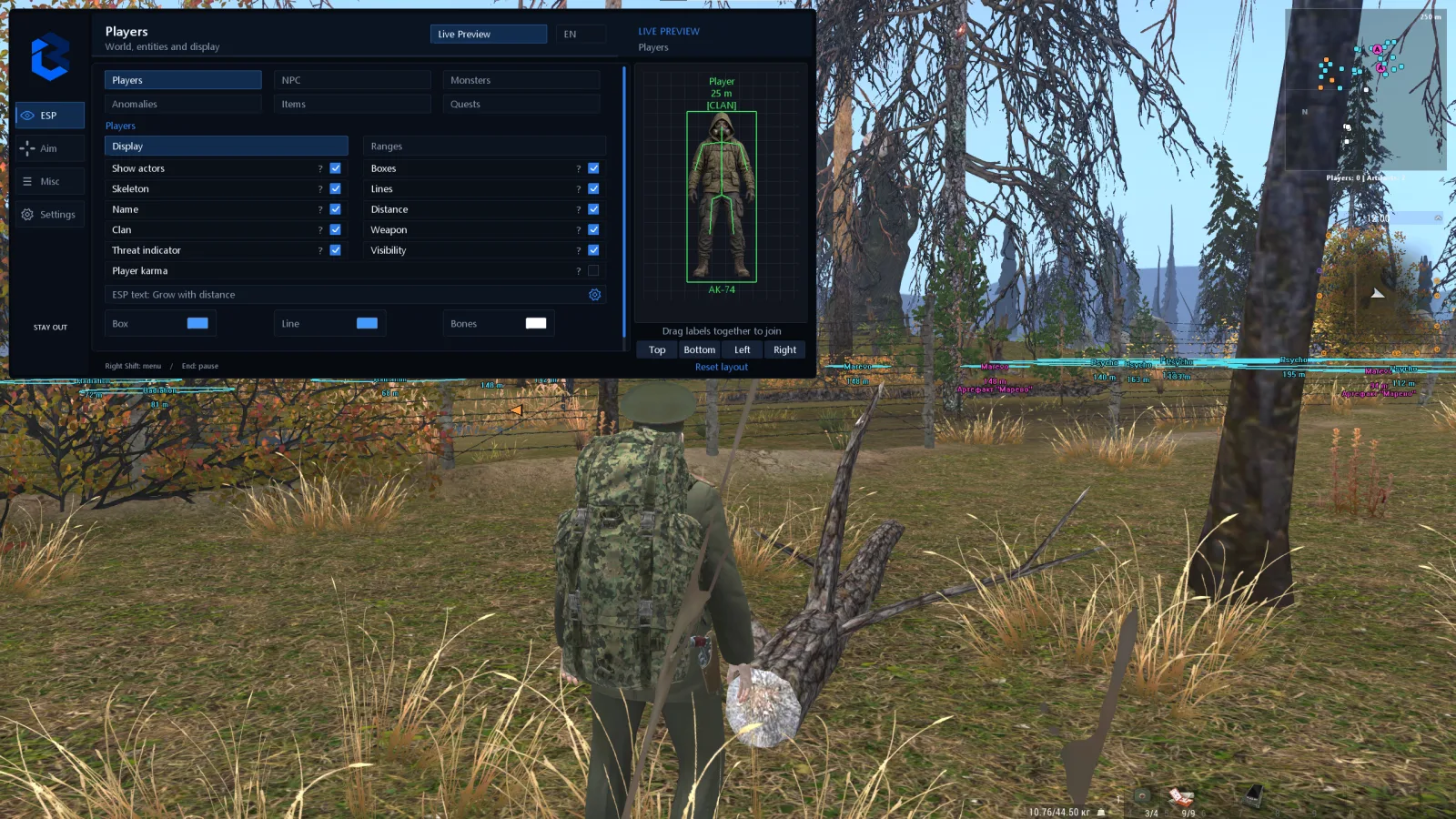
ESP lets you toggle players, NPCs and monsters separately. Boxes, skeletons, names and distance help you judge where targets are, while clan and weapon labels add information about the players you meet. Color indication is provided for the available karma state.
Visible and hidden targets are highlighted differently. Arrows point toward objects beyond the edges of the screen. In the preview you can arrange the labels: for example, keep the name and distance next to the target and remove secondary elements from view.
Anomalies, artifacts and a handy radar
Markers show detected anomalies, radiation and artifacts. Circles around anomalies mark their radius, and after a stone sets one off, the color of its name and circle can change. When surveying an area, it is easier to tell checked spots from the ones you have not checked yet.
The radar shows the relative positions of players, NPCs, monsters, anomalies and artifacts. You choose the categories, radius, size, colors and transparency. Counters separately show the number of detected players and artifacts within the set radius.
Finding specific loot and gathering
Enter part of the name of the item you need in Russian or English. The search is case-insensitive and highlights matches in the chosen color in the ESP and the panel. Matches Only mode leaves only the matches when the query is not empty, which helps when the screen is full of names and you are looking for one particular item.
Nearest loot and a list of detected objects, sorted by distance and filtered by category.
Monster carcasses with a loot availability filter, plus automatic butchering of suitable carcasses nearby.
Container and stash markers, with filtering of objects confirmed empty based on data available to the client.
Ground and quest items with the names and positions of detected objects, plus auto pickup of suitable items nearby.
Artifact extraction with automatic presses in the mini-game at a delay of 0.1 to 1.7 seconds.
Aiming for different targets
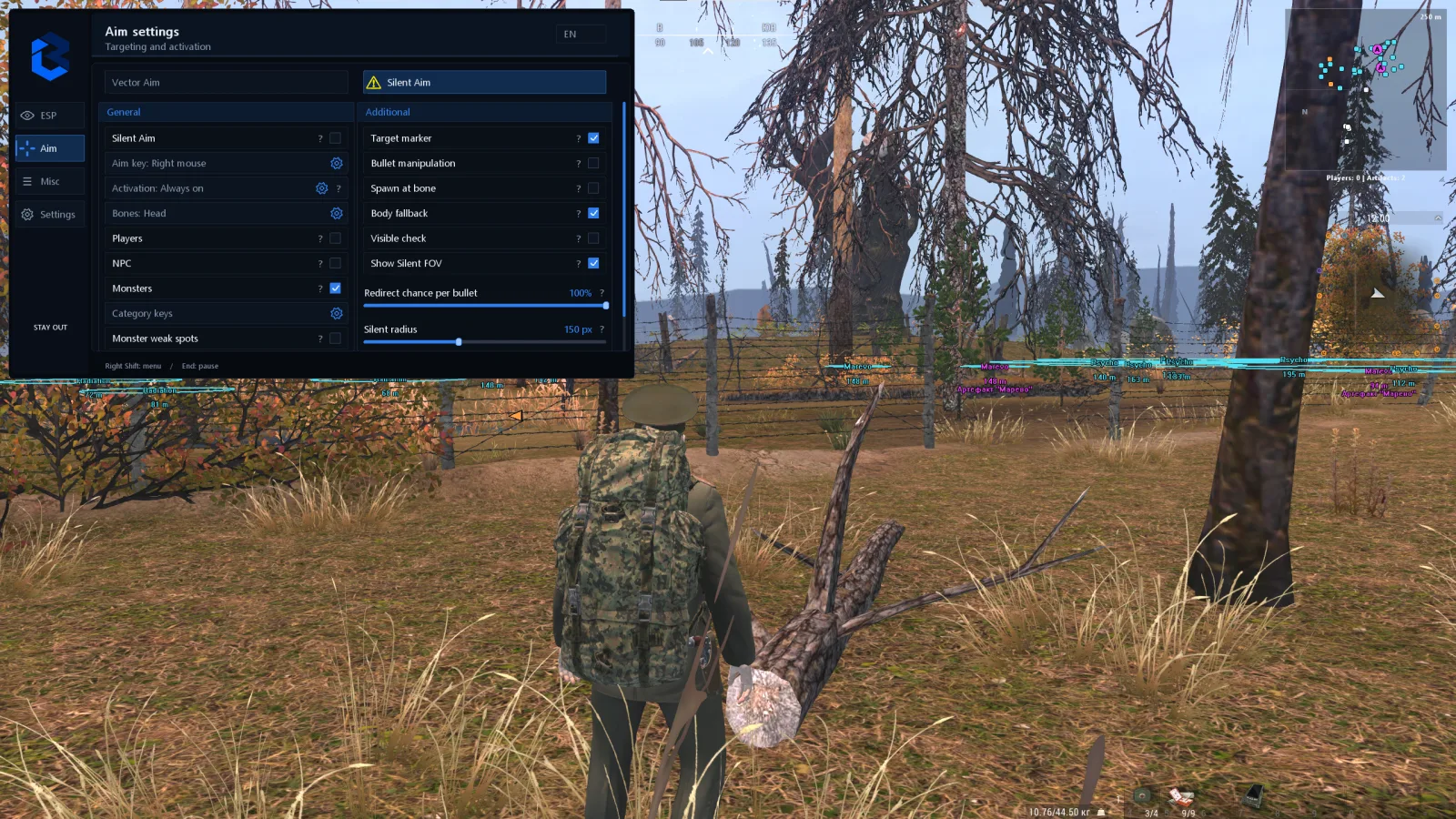
Vector Aim moves the crosshair with adjustable smoothness, speed and radius. Silent Aim corrects the direction of the shot without the usual crosshair movement toward the target. Silent Aim can work all the time, toggle on a key press or activate while a key is held.
Players, NPCs and monsters are enabled separately, each with its own key bindings. You can choose body points, limit aiming to targets visible from the camera and display radius circles. For Silent Aim you set the share of corrected shots, and the selected target is highlighted with a marker.
If data for the required bone is missing, a fallback body point is used. For players and NPCs the bone can change between shots; for monsters you can choose available weak spots with an increased damage multiplier. Players on a nickname whitelist can be excluded from aiming. Additional parameters let you change the bullet spawn point, including placing it on the selected bone.
Weapons and reloading
The weapon block suppresses client-side recoil, spread and weapon sway. Fast reload uses rounds or compatible loaded magazines from your inventory: ammunition is still consumed. There is standard auto-reload for an empty weapon and a list of suitable rounds and magazines.
Loading single rounds is supported for the Nagant, the Mosin, the SKS with manual loading, the Mossberg 500 and both versions of the TOZ-34. Hit markers with a customizable sound and damage numbers help you track events confirmed by the client.
Extra tools for your run
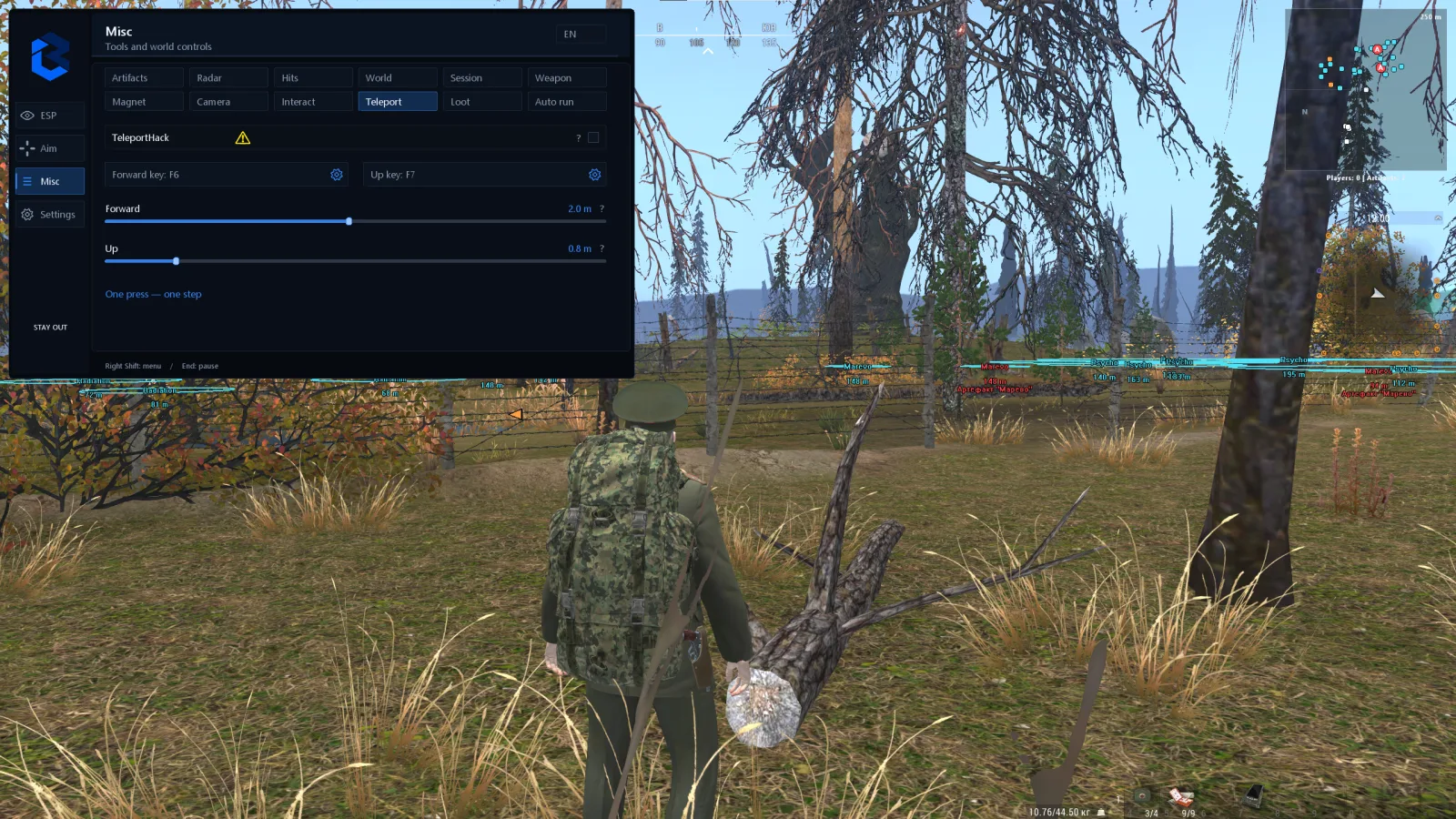
A free camera, zoom on a key and field-of-view adjustment make it easier to look around the scene. Daylight and clear weather are set on the client side. Smart Stone moves a thrown stone to the center of the selected anomaly; also available are temporary client-side relocation of selected anomalies and moving your character forward or up by a set step.
A selected NPC can be saved for regular interaction on a key. Trade and experience counters show the changes available during the session, which is handy for keeping track of the results of a run.
An interface you can tailor to yourself
Panels can be dragged, resized and automatically fit their text. Background transparency is adjusted separately from the text. The active bindings panel shows enabled modes, keys and the activation method. The interface language and the menu key can be changed in the settings.
An encrypted configuration can be copied to the clipboard and loaded back. Save a convenient layout of information and your parameters to use them on future launches.
BURMALDA compatibility
Intel and AMD processors, including Xeon and FX.
NVIDIA and AMD Radeon graphics cards.
Windows 10 and Windows 11; check support for your specific build before buying.
Game mode: borderless window.
Check the current status of BURMALDA and choose an access period on this page. If you have questions about your PC configuration or launch requirements, Cheatrise support will help clarify them before you pay.
Excluded. We carefully check each product, we mentioned this on the first screen of the site.
We will apologize, refund your money, replace the product for free and give you some other cheat codes to boot. But let us repeat – this option is out of the question.
Of course! We provide discounts to regular customers or wholesale buyers on an individual basis.
Yes, the referral program is in development. We will roll out the news as soon as we implement it!
Yes. The high quality of our cheats and our 10 years of experience in development will allow you to feel absolutely calm. We are constantly working: bypassing anti-cheat, improving our software and competently using the insights we receive. Whatever new protection game developers come up with, we will always find an antidote.
Yes, of course! Our range is dynamic. Cheats for Warface, BloodHunt, CS:GO, DayZ, PUBG are some of our few offers. You can also contact support with a specific request, and perhaps we will be able to help you
1. Where can I find the purchased cheat?
Immediately after payment, you will get access to the product in two ways:
-On the page after payment, you will receive a key, instructions, and a link.
-A letter with activation data will be sent to your email (check the Spam folder if you do not see the letter).
2. What's inside?
Each cheat includes three key elements:
Key (activation key):
Examples of formats:
XXX-XXX-XXX or okfds85u34sdkofsdkf.
This is your unique code for running the cheat.
Loader (loader):
Download link for the program that injects the cheat into the game.
Files are checked for viruses - temporarily disable your antivirus during installation.
Manual (instructions).
3. How to activate the cheat?
Download Loader from the email or your personal account.
Run it as administrator.
Enter the Key in the appropriate field.
Follow the steps from Manual.
4. If something went wrong
The letter didn't arrive?
Wait 5-10 minutes → check "Spam" → if not, write to support indicating the email you entered when paying.
The key doesn't work?
Make sure you copied it without spaces. If the problem persists, send a screenshot of the error in the chat.
Loader is blocked?
Add it to the antivirus/firewall exceptions (instructions are in Manual).
5. Security reminder
Do not share the Key and Loader with anyone - this will lead to your license being blocked.
For RAGE cheats, always use the Spoofer from the kit to protect your hardware from being banned.
1. Disabling system protection
Before using cheats, you must eliminate all software conflicts:








%22%3E%3Crect x=%222.5%22 y=%222.5%22 width=%228.6%22 height=%228.6%22 rx=%221.4%22/%3E%3Crect x=%2212.9%22 y=%222.5%22 width=%228.6%22 height=%228.6%22 rx=%221.4%22/%3E%3Crect x=%222.5%22 y=%2212.9%22 width=%228.6%22 height=%228.6%22 rx=%221.4%22/%3E%3Crect x=%2212.9%22 y=%2212.9%22 width=%228.6%22 height=%228.6%22 rx=%221.4%22/%3E%3C/g%3E%3Cdefs%3E%3ClinearGradient id=%22g%22 x1=%221%22 y1=%2212%22 x2=%2223%22 y2=%2212%22 gradientUnits=%22userSpaceOnUse%22%3E%3Cstop stop-color=%22%238468FF%22/%3E%3Cstop offset=%221%22 stop-color=%22%23603DFA%22/%3E%3C/linearGradient%3E%3C/defs%3E%3C/svg%3E) System
Windows 10 — 20H2-21H121H2-22H2
Windows 11 — 22H2-23H2-24H2-25H2-26H2
%22%3E%3Cpath fill-rule=%22evenodd%22 clip-rule=%22evenodd%22 d=%22M7.5 4.6H16.5C18.1 4.6 19.4 5.9 19.4 7.5V16.5C19.4 18.1 18.1 19.4 16.5 19.4H7.5C5.9 19.4 4.6 18.1 4.6 16.5V7.5C4.6 5.9 5.9 4.6 7.5 4.6ZM9.6 8H14.4C15.3 8 16 8.7 16 9.6V14.4C16 15.3 15.3 16 14.4 16H9.6C8.7 16 8 15.3 8 14.4V9.6C8 8.7 8.7 8 9.6 8ZM10.6 9.6C10.05 9.6 9.6 10.05 9.6 10.6V13.4C9.6 13.95 10.05 14.4 10.6 14.4H13.4C13.95 14.4 14.4 13.95 14.4 13.4V10.6C14.4 10.05 13.95 9.6 13.4 9.6H10.6Z%22/%3E%3Crect x=%227.9%22 y=%221.6%22 width=%221.7%22 height=%223.6%22 rx=%220.85%22/%3E%3Crect x=%2211.15%22 y=%221.6%22 width=%221.7%22 height=%223.6%22 rx=%220.85%22/%3E%3Crect x=%2214.4%22 y=%221.6%22 width=%221.7%22 height=%223.6%22 rx=%220.85%22/%3E%3Crect x=%227.9%22 y=%2218.8%22 width=%221.7%22 height=%223.6%22 rx=%220.85%22/%3E%3Crect x=%2211.15%22 y=%2218.8%22 width=%221.7%22 height=%223.6%22 rx=%220.85%22/%3E%3Crect x=%2214.4%22 y=%2218.8%22 width=%221.7%22 height=%223.6%22 rx=%220.85%22/%3E%3Crect x=%221.6%22 y=%227.9%22 width=%223.6%22 height=%221.7%22 rx=%220.85%22/%3E%3Crect x=%221.6%22 y=%2211.15%22 width=%223.6%22 height=%221.7%22 rx=%220.85%22/%3E%3Crect x=%221.6%22 y=%2214.4%22 width=%223.6%22 height=%221.7%22 rx=%220.85%22/%3E%3Crect x=%2218.8%22 y=%227.9%22 width=%223.6%22 height=%221.7%22 rx=%220.85%22/%3E%3Crect x=%2218.8%22 y=%2211.15%22 width=%223.6%22 height=%221.7%22 rx=%220.85%22/%3E%3Crect x=%2218.8%22 y=%2214.4%22 width=%223.6%22 height=%221.7%22 rx=%220.85%22/%3E%3C/g%3E%3Cdefs%3E%3ClinearGradient id=%22g%22 x1=%221%22 y1=%2212%22 x2=%2223%22 y2=%2212%22 gradientUnits=%22userSpaceOnUse%22%3E%3Cstop stop-color=%22%238468FF%22/%3E%3Cstop offset=%221%22 stop-color=%22%23603DFA%22/%3E%3C/linearGradient%3E%3C/defs%3E%3C/svg%3E) Processor
Intel and AMD



%22/%3E%3Cpath d=%22M138.98 0L138.98 -2.89H138.98V0ZM277.96 138.98H280.85V138.98H277.96ZM138.98 277.96V280.85H138.98L138.98 277.96ZM9.39 271.16L9.74 274.03H9.74L9.39 271.16ZM1.47 262.3L-1.34 261.62L-1.34 261.62L1.47 262.3ZM14.56 208.18L11.76 207.5H11.76L14.56 208.18ZM0 138.98H-2.89V138.98H0ZM14.66 201.17L17.24 199.88L14.66 201.17ZM64.84 264.21L65.2 267.08L64.84 264.21ZM138.98 0L138.98 2.89C214.15 2.89 275.08 63.82 275.08 138.98H277.96H280.85C280.85 60.63 217.34 -2.89 138.98 -2.89L138.98 0ZM277.96 138.98H275.08C275.08 214.14 214.15 275.08 138.98 275.08L138.98 277.96L138.98 280.85C217.34 280.85 280.85 217.33 280.85 138.98H277.96ZM138.98 277.96V275.08C120.58 275.08 103.04 271.43 87.04 264.81L85.94 267.48L84.83 270.15C101.52 277.05 119.81 280.85 138.98 280.85V277.96ZM64.84 264.21L64.48 261.35L9.03 268.3L9.39 271.16L9.74 274.03L65.2 267.08L64.84 264.21ZM9.39 271.16L9.03 268.3C6.02 268.67 3.57 265.93 4.28 262.98L1.47 262.3L-1.34 261.62C-3 268.5 2.73 274.91 9.74 274.03L9.39 271.16ZM1.47 262.3L4.28 262.98L17.37 208.85L14.56 208.18L11.76 207.5L-1.34 261.62L1.47 262.3ZM14.66 201.17L17.24 199.88C8.06 181.56 2.89 160.88 2.89 138.98H0H-2.89C-2.89 161.8 2.5 183.36 12.08 202.47L14.66 201.17ZM0 138.98H2.89C2.89 63.82 63.82 2.89 138.98 2.89V0V-2.89C60.63 -2.89 -2.89 60.63 -2.89 138.98H0ZM14.56 208.18L17.37 208.85C17.64 207.73 17.99 206.28 18.1 204.81C18.21 203.31 18.09 201.57 17.24 199.88L14.66 201.17L12.08 202.47C12.29 202.9 12.4 203.5 12.34 204.39C12.27 205.32 12.04 206.31 11.76 207.5L14.56 208.18ZM85.94 267.48L87.04 264.81C80.01 261.9 72.27 260.37 64.48 261.35L64.84 264.21L65.2 267.08C71.77 266.25 78.49 267.53 84.83 270.15L85.94 267.48Z%22 fill=%22white%22 style=%22mix-blend-mode:soft-light%22 mask=%22url(%23path-1-inside-1_0_319)%22/%3E%3C/g%3E%3Cdefs%3E%3ClinearGradient id=%22paint0_linear_0_319%22 x1=%22-22.4%22 y1=%22173.9%22 x2=%22300.4%22 y2=%22104%22 gradientUnits=%22userSpaceOnUse%22%3E%3Cstop stop-color=%22%23373ADA%22/%3E%3Cstop offset=%221%22 stop-color=%22%23A2A9FB%22/%3E%3C/linearGradient%3E%3C/defs%3E%3C/svg%3E)