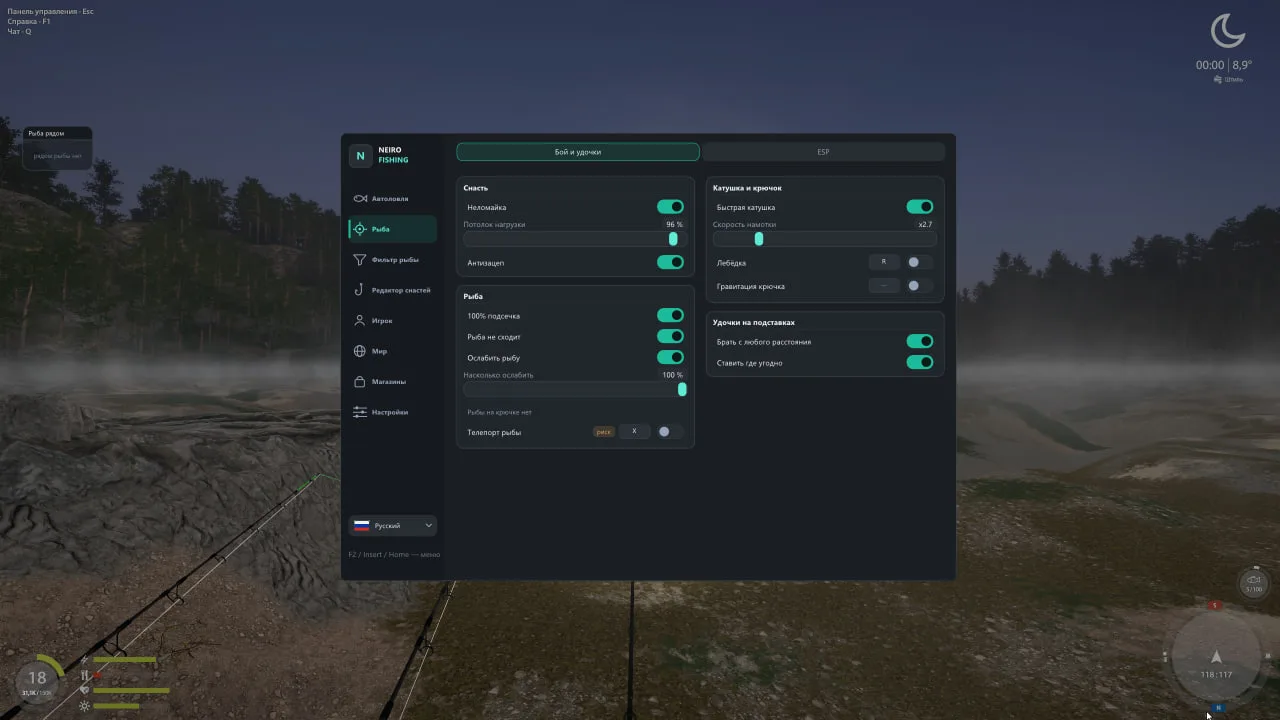
Anti-snag: the lure never catches on sunken trees- weeds or stones
Teleport the hooked fish to you with a key
Rods on stands: take from any distance- place anywhere- water included
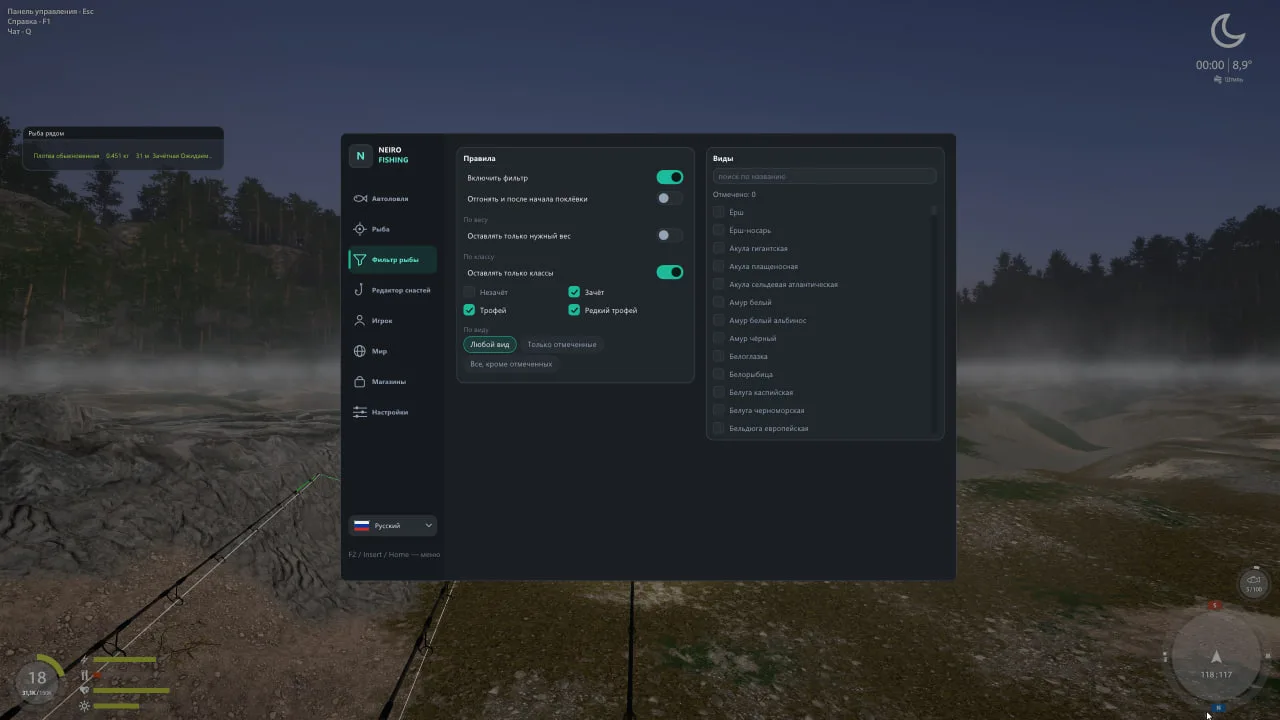
Fish filter
Unwanted fish swims away before the bite
By weight (range 0.001–9999 kg)- by class (undersized / keeper / trophy / rare trophy)- by species with a search over the game's whole fish list
Optionally: scare off even after the bite starts
ESP
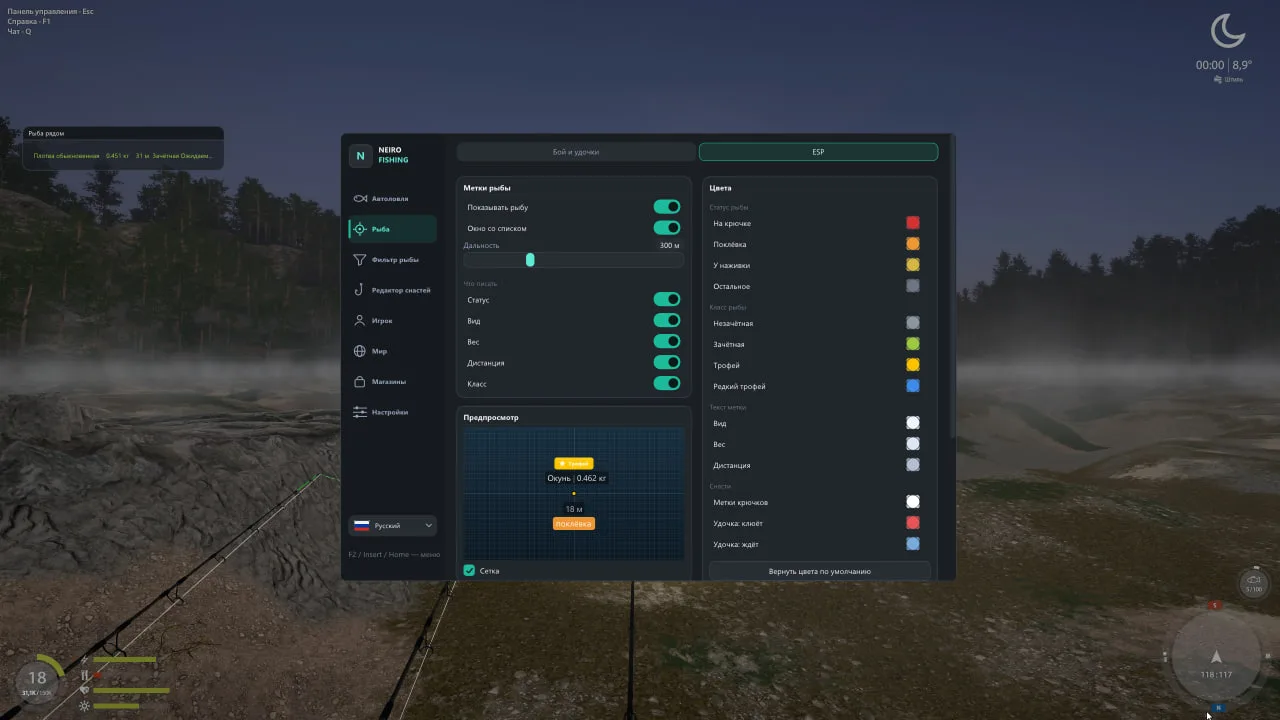
A label over every fish: status (hooked/bite/at the bait)/species/weight/distance/class
Interactive preview in the menu: drag the elements/zoom with the wheel/a snapping grid for a symmetric layout
A custom colour for every element- fish status and class
A draggable "Fish nearby" window- nearest first
Display range- rod markers with slot number and state- hook markers under water
Sonar at the crosshair: depth/bottom type and distance at the point you look at/a 3D marker on the water
Bright line and rod highlight (marked as "risk")
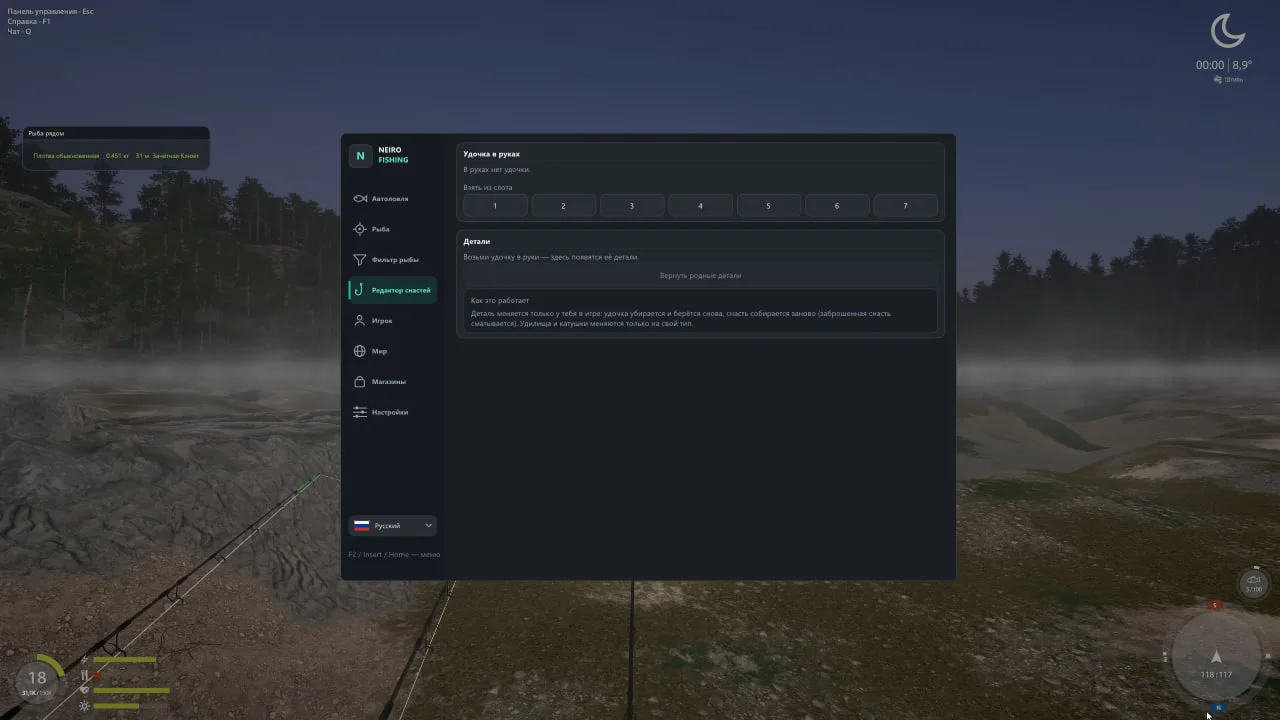
Tackle editor
Replace any part of the rod in hands from the game's catalogue with pictures- search and stat comparison
Restore the original parts with one button
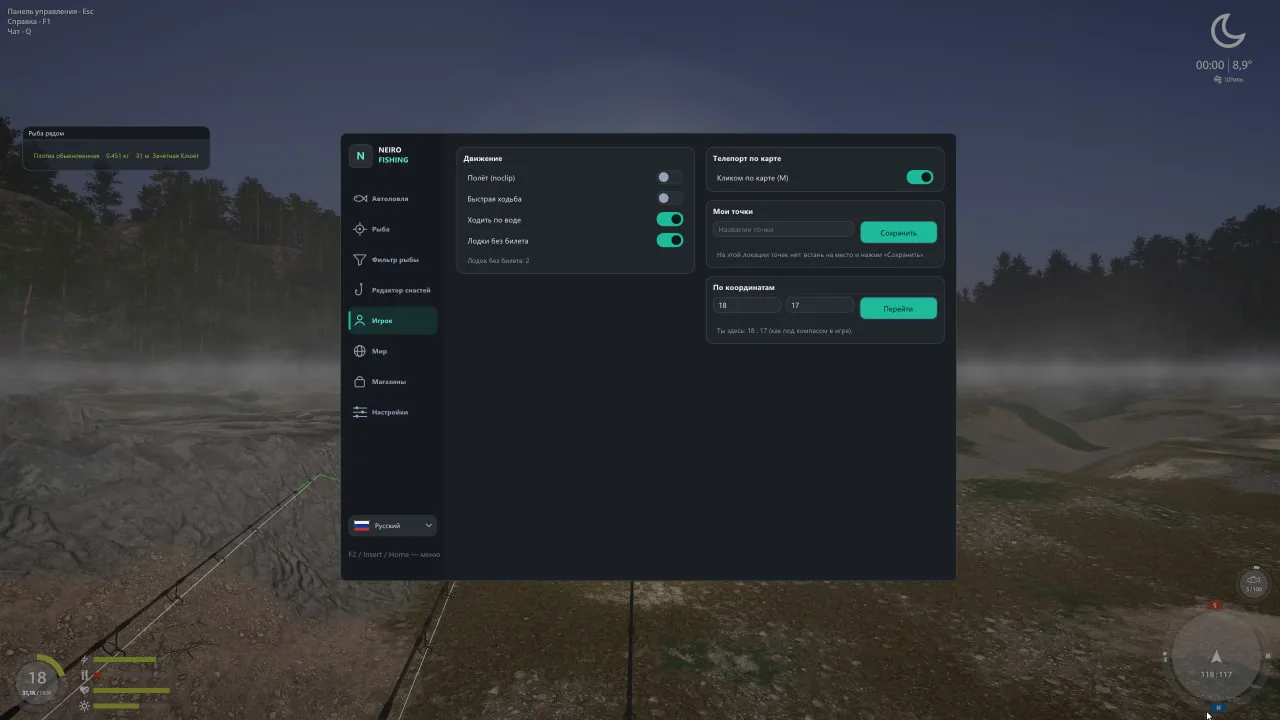
Player
Flight (noclip) with adjustable speed
Fast walking
Walk on water: removes the invisible wall at the shore
Boats without a ticket
Teleport by a click on the map- to saved points and to coordinates as under the compass
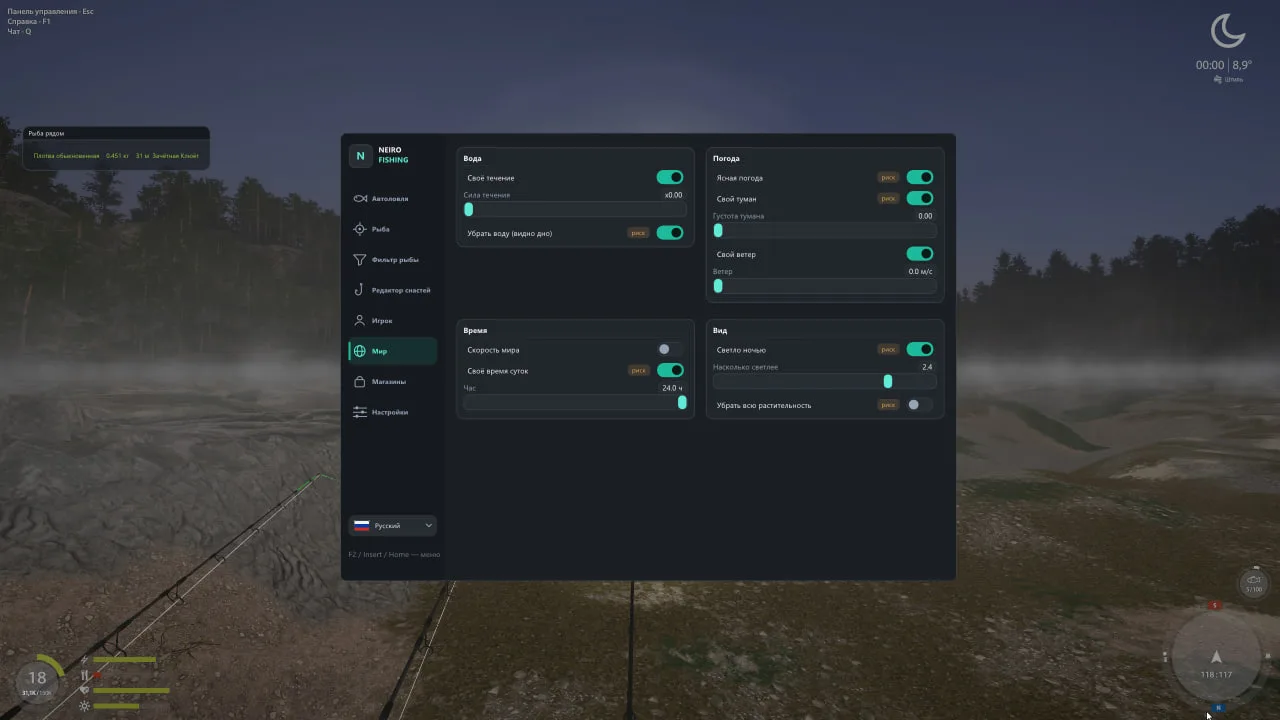
World
Custom current (down to none)
Clear weather- custom fog
custom wind
World speed- custom time of day
Bright at night/remove all vegetation/ remove water (see the bottom)
Everything that can land on a game screenshot is marked "risk"
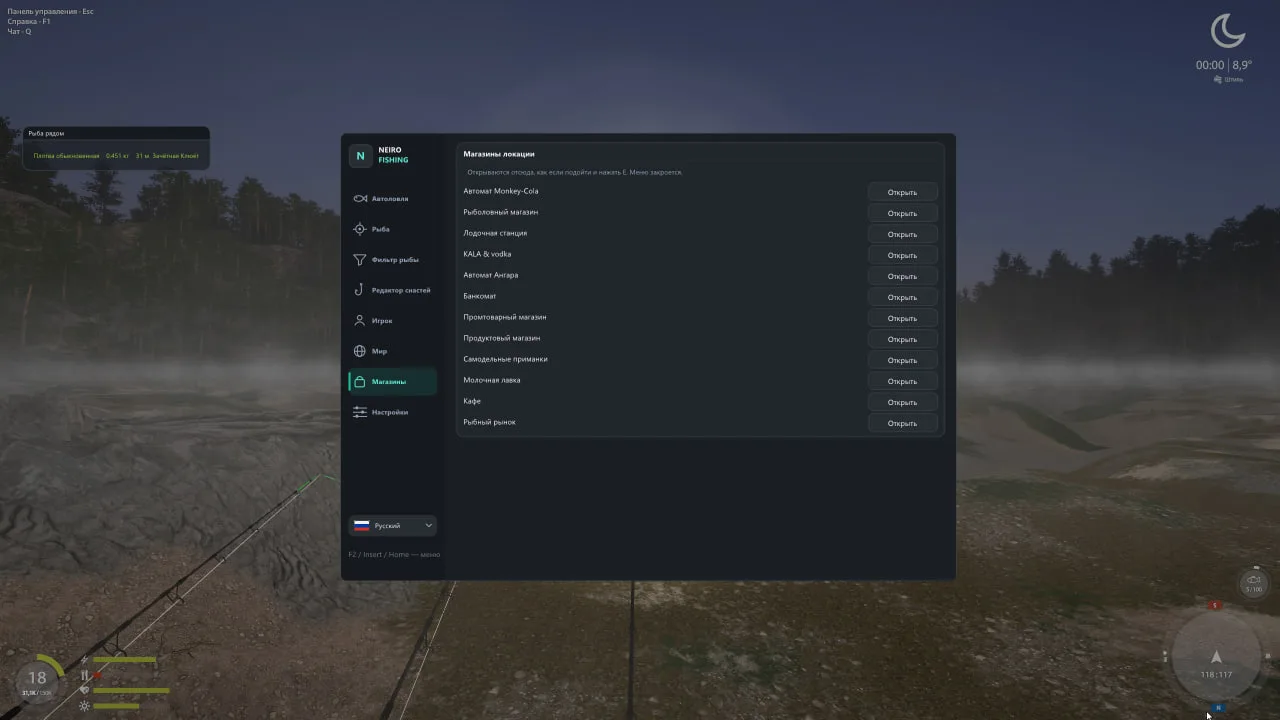
Shops
Any shop/café/market/administration or ATM of the location opens from the menu without walking up to it
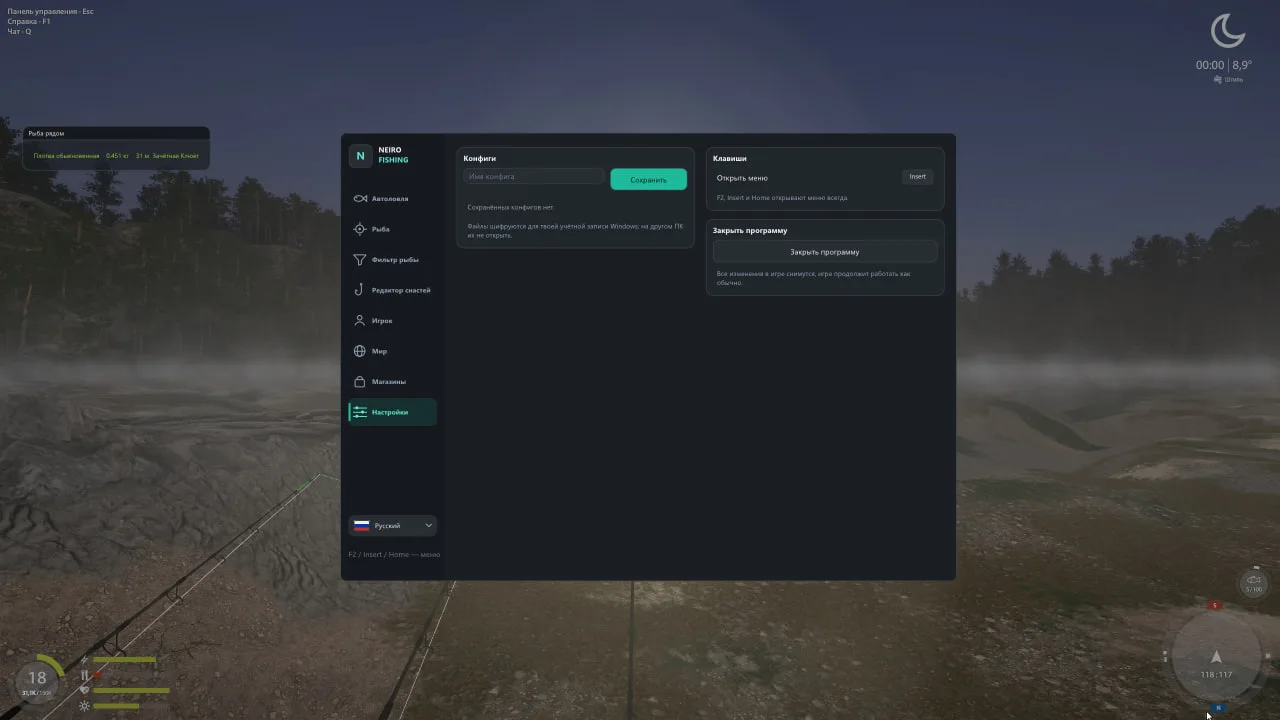
Settings and comfort
8 interface languages: Russian/English/German/Spanish/French/Italian/Indonesian/Japanese — every language of the game
Named configs/auto-save/a custom menu key
A "?" help on every feature
The menu and the windows remember their place
Settings are encrypted for your Windows account
The overlay is hidden from screenshots and screen recording
Start the program before the game- in the main menu or already on the water
Automatic adjustment to game patches by name fingerprints
NEIRO for Russian Fishing 4 takes over the repetitive actions a long fishing session is made of: casting, handling bites, playing the fish and sorting the keepnet. Set up fish selection, connect several rods on stands and define when to stop. ESP, the echo sounder and session statistics help you keep track of what is happening at your chosen spot.
A full auto-fishing cycle on several rods
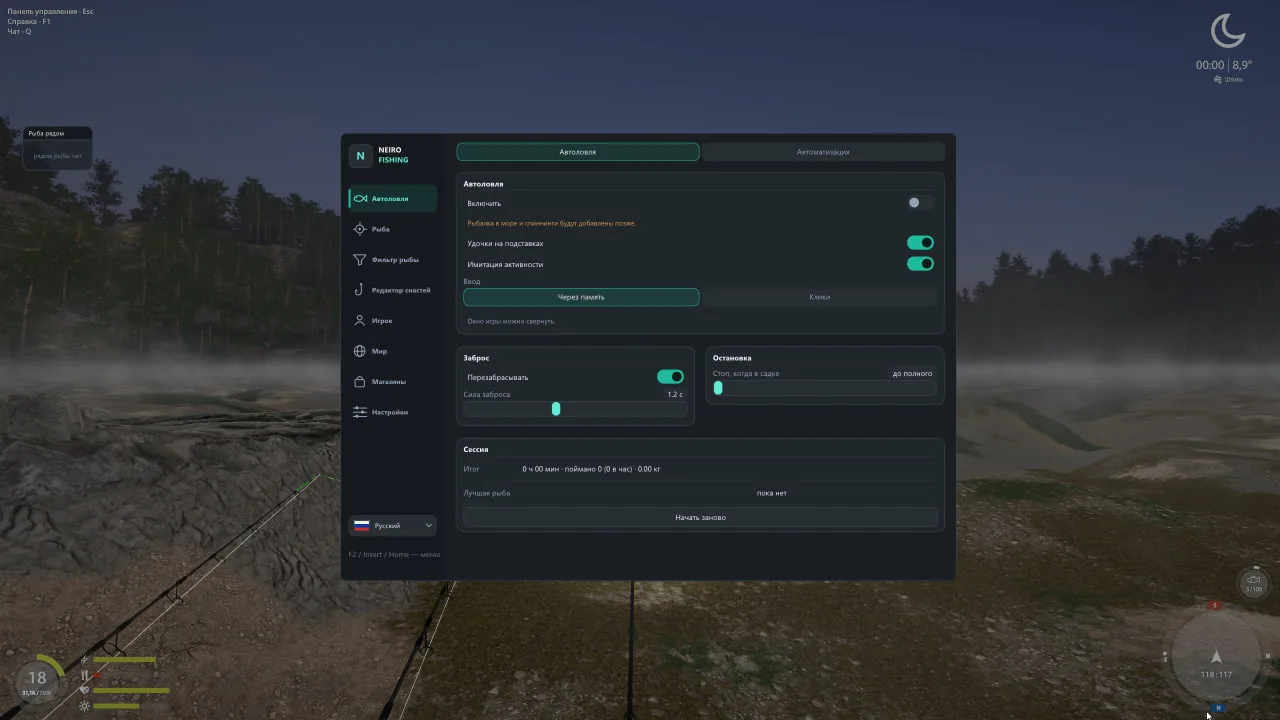
The bot casts the tackle, waits for a bite, sets the hook, plays the fish, puts it into the keepnet and casts again. If you use rods on stands, NEIRO picks the slot with a bite, takes the right rod, finishes playing the fish and returns the rod to its place after casting.
You can set the casting power and stop after a number of fish in the keepnet or when it is full. Memory-based input lets you minimize the game window; the other mode uses real mouse clicks. Camera and keepnet actions are provided to keep the character active.
Statistics show the session time, the number and total weight of the catch, fish per hour and the best fish. Sea and spinning auto-fishing are still in development.
Select the catch for your goal
Need a particular species or interested in a specific catch class? NEIRO lets you set conditions under which unsuitable fish are scared off even before the bite. Selection after the bite has started can be enabled separately.
By species: search through the full list of fish in the game.
By weight: choose a suitable range.
By class: non-qualifying, qualifying, trophy or rare trophy.
Filters work with the fish available under current in-game conditions. They pair well with keepnet management to reduce unwanted bites and keep suitable fish for sorting later.
Data on the fish and the fishing spot
ESP shows the species, weight, distance, class and state of a fish: near the bait, biting or on the hook. In the “Fish nearby” window, objects are listed from nearest to farthest. Additional markers show rods with their slot number and state, as well as the position of hooks underwater.
The echo sounder under the crosshair displays depth, bottom type and the distance to the point you are looking at. A 3D marker helps mark this point on the water. Information about the fish and the bottom stays at hand while you fish.
Markers can be set up in an interactive preview: drag elements, zoom with the mouse wheel and snap to a grid. Separate colors can be set for elements, states and fish classes; display distance is adjustable. For example, you can make the class you care about stand out and keep secondary labels subdued.
Load control and help when playing the fish
The load limiter lets you set the allowed percentage of the tackle limit separately for each rod. Help with hooking when reeling starts and protection against losing the fish are available. Fish weakening is adjustable from 1 to 100% and does not change its fatigue indicator.
Fast reel and winch speed up playing the fish; the winch is engaged by holding a key.
Hook gravity with settings for sinking, rising or holding position.
Anti-snag keeps the hook from catching on snags, weeds and stones.
Hooked fish transfer moves the fish to your character on a key press.
Café orders and selling while keeping the fish you need
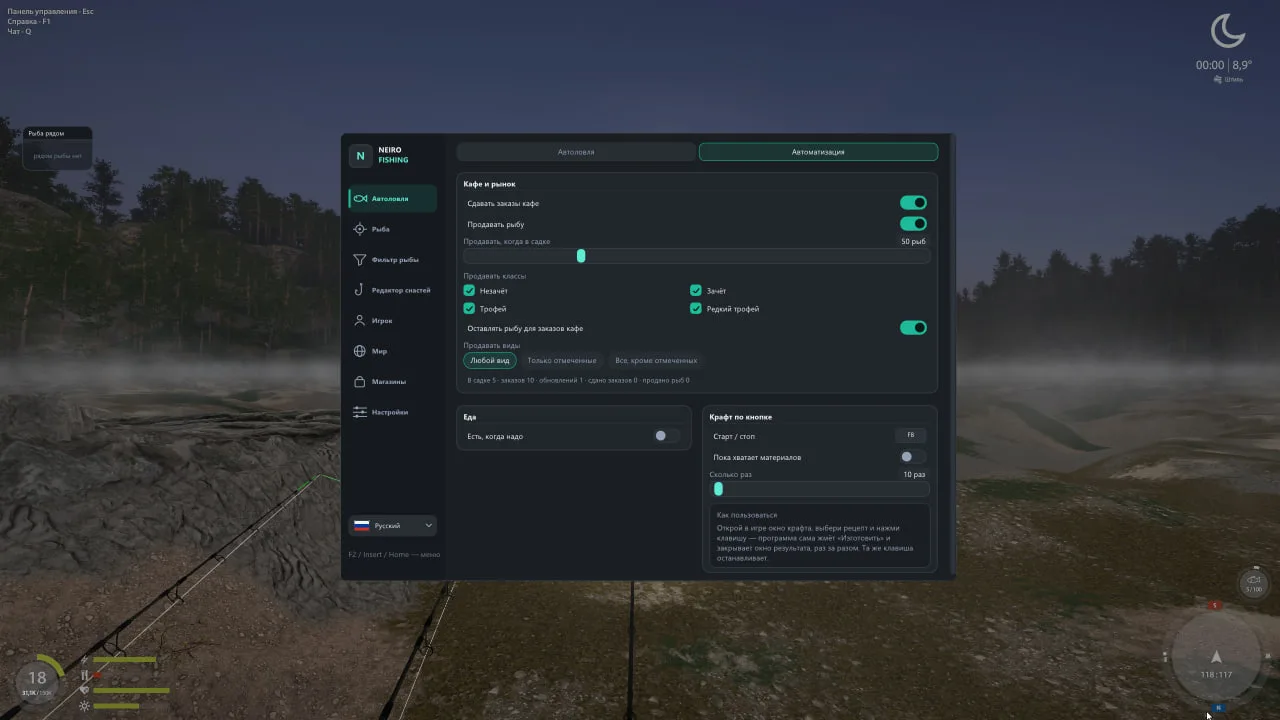
NEIRO picks the most expensive café order for which there is already enough fish in the keepnet. Trophies are not handed in for orders, and you do not need to open the café window manually. This lets you use suitable fish and keep valuable specimens.
Auto-selling at the market starts at a set keepnet fill threshold and takes fish species and class into account. Fish needed for open café orders is not sold. Order hand-ins and selling take the contents of the keepnet into account, cutting down on manually sorting the catch after a series of bites.
Tackle and upkeep between bites
Auto-eat uses an item from a quick slot at set satiety and energy thresholds. Crafting starts on a key for a chosen number of repeats or until materials run out. The shop, café, market, administration and ATM of the current location can be opened from the menu without walking up to them.
The tackle editor lets you replace a part of the tackle in your hands by choosing it from the in-game catalog with images, search and stat comparison. The original parts are restored with one button. Rods on stands can be picked up from any distance and placed at a chosen spot, including on the water.
Movement, the world and interface settings
Movement options include faster walking, flying, walking on water, boats without a ticket and moving to points on the map, by coordinates or to saved positions. World settings let you change the current, weather, wind, fog, time of day and lighting, and remove water or vegetation. Visible changes to the world and tackle are labeled “risk” in the program.
The interface supports eight languages, including Russian. Features have tooltips, and there are named configurations, autosave and a choice of menu key. Windows remember their position, and settings are encrypted for your Windows account. The program can be launched before the game, in the main menu or already at the water.
NEIRO compatibility
Windows 10 and Windows 11.
Intel and AMD processors.
NVIDIA, AMD and Intel graphics cards.
Steam and Game Launcher clients.
Windowed or borderless game mode.
No USB flash drive required; no built-in spoofer.
Before buying, check the current status of NEIRO and the launch requirements for your PC, then choose an access period. Hiding the overlay from screen recording does not hide all changes to the game world and does not rule out the risk of an account ban.
SystemWindows 10 — all bildsWindows 11 — all bilds
ProcessorIntel and AMD
Graphics cardNVIDIA, AMD and Intel
Game clientSteam, Game Launcher
Window modeWindowed and borderless
Built-in spooferNo
USB flash driveNot required
There are no reviews of this cheat yet.
Bought it and gave it a try? Tell us how it works — it will help others.
Excluded. We carefully check each product, we mentioned this on the first screen of the site.
We will apologize, refund your money, replace the product for free and give you some other cheat codes to boot. But let us repeat – this option is out of the question.
Of course! We provide discounts to regular customers or wholesale buyers on an individual basis.
Yes, the referral program is in development. We will roll out the news as soon as we implement it!
Yes. The high quality of our cheats and our 10 years of experience in development will allow you to feel absolutely calm. We are constantly working: bypassing anti-cheat, improving our software and competently using the insights we receive. Whatever new protection game developers come up with, we will always find an antidote.
Yes, of course! Our range is dynamic. Cheats for Warface, BloodHunt, CS:GO, DayZ, PUBG are some of our few offers. You can also contact support with a specific request, and perhaps we will be able to help you
1. Where can I find the purchased cheat?
Immediately after payment, you will get access to the product in two ways:
-On the page after payment, you will receive a key, instructions, and a link.
-A letter with activation data will be sent to your email (check the Spam folder if you do not see the letter).
2. What's inside?
Each cheat includes three key elements:
Key (activation key):
Examples of formats:
XXX-XXX-XXX or okfds85u34sdkofsdkf.
This is your unique code for running the cheat.
Loader (loader):
Download link for the program that injects the cheat into the game.
Files are checked for viruses - temporarily disable your antivirus during installation.
Manual (instructions).
3. How to activate the cheat?
Download Loader from the email or your personal account.
Run it as administrator.
Enter the Key in the appropriate field.
Follow the steps from Manual.
4. If something went wrong
The letter didn't arrive?
Wait 5-10 minutes → check "Spam" → if not, write to support indicating the email you entered when paying.
The key doesn't work?
Make sure you copied it without spaces. If the problem persists, send a screenshot of the error in the chat.
Loader is blocked?
Add it to the antivirus/firewall exceptions (instructions are in Manual).
5. Security reminder
Do not share the Key and Loader with anyone - this will lead to your license being blocked.
For RAGE cheats, always use the Spoofer from the kit to protect your hardware from being banned.
1. Disabling system protection
Before using cheats, you must eliminate all software conflicts:
















%22%3E%3Crect x=%222.5%22 y=%222.5%22 width=%228.6%22 height=%228.6%22 rx=%221.4%22/%3E%3Crect x=%2212.9%22 y=%222.5%22 width=%228.6%22 height=%228.6%22 rx=%221.4%22/%3E%3Crect x=%222.5%22 y=%2212.9%22 width=%228.6%22 height=%228.6%22 rx=%221.4%22/%3E%3Crect x=%2212.9%22 y=%2212.9%22 width=%228.6%22 height=%228.6%22 rx=%221.4%22/%3E%3C/g%3E%3Cdefs%3E%3ClinearGradient id=%22g%22 x1=%221%22 y1=%2212%22 x2=%2223%22 y2=%2212%22 gradientUnits=%22userSpaceOnUse%22%3E%3Cstop stop-color=%22%238468FF%22/%3E%3Cstop offset=%221%22 stop-color=%22%23603DFA%22/%3E%3C/linearGradient%3E%3C/defs%3E%3C/svg%3E) System
Windows 10 — all bilds
Windows 11 — all bilds
%22%3E%3Cpath fill-rule=%22evenodd%22 clip-rule=%22evenodd%22 d=%22M7.5 4.6H16.5C18.1 4.6 19.4 5.9 19.4 7.5V16.5C19.4 18.1 18.1 19.4 16.5 19.4H7.5C5.9 19.4 4.6 18.1 4.6 16.5V7.5C4.6 5.9 5.9 4.6 7.5 4.6ZM9.6 8H14.4C15.3 8 16 8.7 16 9.6V14.4C16 15.3 15.3 16 14.4 16H9.6C8.7 16 8 15.3 8 14.4V9.6C8 8.7 8.7 8 9.6 8ZM10.6 9.6C10.05 9.6 9.6 10.05 9.6 10.6V13.4C9.6 13.95 10.05 14.4 10.6 14.4H13.4C13.95 14.4 14.4 13.95 14.4 13.4V10.6C14.4 10.05 13.95 9.6 13.4 9.6H10.6Z%22/%3E%3Crect x=%227.9%22 y=%221.6%22 width=%221.7%22 height=%223.6%22 rx=%220.85%22/%3E%3Crect x=%2211.15%22 y=%221.6%22 width=%221.7%22 height=%223.6%22 rx=%220.85%22/%3E%3Crect x=%2214.4%22 y=%221.6%22 width=%221.7%22 height=%223.6%22 rx=%220.85%22/%3E%3Crect x=%227.9%22 y=%2218.8%22 width=%221.7%22 height=%223.6%22 rx=%220.85%22/%3E%3Crect x=%2211.15%22 y=%2218.8%22 width=%221.7%22 height=%223.6%22 rx=%220.85%22/%3E%3Crect x=%2214.4%22 y=%2218.8%22 width=%221.7%22 height=%223.6%22 rx=%220.85%22/%3E%3Crect x=%221.6%22 y=%227.9%22 width=%223.6%22 height=%221.7%22 rx=%220.85%22/%3E%3Crect x=%221.6%22 y=%2211.15%22 width=%223.6%22 height=%221.7%22 rx=%220.85%22/%3E%3Crect x=%221.6%22 y=%2214.4%22 width=%223.6%22 height=%221.7%22 rx=%220.85%22/%3E%3Crect x=%2218.8%22 y=%227.9%22 width=%223.6%22 height=%221.7%22 rx=%220.85%22/%3E%3Crect x=%2218.8%22 y=%2211.15%22 width=%223.6%22 height=%221.7%22 rx=%220.85%22/%3E%3Crect x=%2218.8%22 y=%2214.4%22 width=%223.6%22 height=%221.7%22 rx=%220.85%22/%3E%3C/g%3E%3Cdefs%3E%3ClinearGradient id=%22g%22 x1=%221%22 y1=%2212%22 x2=%2223%22 y2=%2212%22 gradientUnits=%22userSpaceOnUse%22%3E%3Cstop stop-color=%22%238468FF%22/%3E%3Cstop offset=%221%22 stop-color=%22%23603DFA%22/%3E%3C/linearGradient%3E%3C/defs%3E%3C/svg%3E) Processor
Intel and AMD
%22%3E%3Crect x=%221.4%22 y=%224.2%22 width=%221.8%22 height=%2215.4%22 rx=%220.9%22/%3E%3Cpath fill-rule=%22evenodd%22 clip-rule=%22evenodd%22 d=%22M6.3 5.6H20.4C21.6 5.6 22.6 6.6 22.6 7.8V14.6C22.6 15.8 21.6 16.8 20.4 16.8H6.3C5.1 16.8 4.1 15.8 4.1 14.6V7.8C4.1 6.6 5.1 5.6 6.3 5.6ZM9.6 8.1C8 8.1 6.7 9.5 6.7 11.2C6.7 12.9 8 14.3 9.6 14.3C11.2 14.3 12.5 12.9 12.5 11.2C12.5 9.5 11.2 8.1 9.6 8.1ZM9.6 10.1C10.2 10.1 10.7 10.6 10.7 11.2C10.7 11.8 10.2 12.3 9.6 12.3C9 12.3 8.5 11.8 8.5 11.2C8.5 10.6 9 10.1 9.6 10.1ZM17.1 8.1C15.5 8.1 14.2 9.5 14.2 11.2C14.2 12.9 15.5 14.3 17.1 14.3C18.7 14.3 20 12.9 20 11.2C20 9.5 18.7 8.1 17.1 8.1ZM17.1 10.1C17.7 10.1 18.2 10.6 18.2 11.2C18.2 11.8 17.7 12.3 17.1 12.3C16.5 12.3 16 11.8 16 11.2C16 10.6 16.5 10.1 17.1 10.1Z%22/%3E%3Crect x=%227.4%22 y=%2217.6%22 width=%229.6%22 height=%222%22 rx=%220.6%22/%3E%3C/g%3E%3Cdefs%3E%3ClinearGradient id=%22g%22 x1=%221%22 y1=%2212%22 x2=%2223%22 y2=%2212%22 gradientUnits=%22userSpaceOnUse%22%3E%3Cstop stop-color=%22%238468FF%22/%3E%3Cstop offset=%221%22 stop-color=%22%23603DFA%22/%3E%3C/linearGradient%3E%3C/defs%3E%3C/svg%3E) Graphics card
NVIDIA, AMD and Intel
%22/%3E%3Cdefs%3E%3ClinearGradient id=%22g%22 x1=%221%22 y1=%2212%22 x2=%2223%22 y2=%2212%22 gradientUnits=%22userSpaceOnUse%22%3E%3Cstop stop-color=%22%238468FF%22/%3E%3Cstop offset=%221%22 stop-color=%22%23603DFA%22/%3E%3C/linearGradient%3E%3C/defs%3E%3C/svg%3E) Game client
Steam, Game Launcher
%22%3E%3Cpath fill-rule=%22evenodd%22 clip-rule=%22evenodd%22 d=%22M4.4 2.8H19.6C20.9 2.8 22 3.9 22 5.2V14.6C22 15.9 20.9 17 19.6 17H4.4C3.1 17 2 15.9 2 14.6V5.2C2 3.9 3.1 2.8 4.4 2.8ZM7.2 5.8C6.4 5.8 5.8 6.4 5.8 7.2V12.6C5.8 13.4 6.4 14 7.2 14H16.8C17.6 14 18.2 13.4 18.2 12.6V7.2C18.2 6.4 17.6 5.8 16.8 5.8H7.2ZM7.6 8.6H16.4V11.9C16.4 12.1 16.25 12.25 16.05 12.25H7.95C7.75 12.25 7.6 12.1 7.6 11.9V8.6Z%22/%3E%3Crect x=%2210.6%22 y=%2216.4%22 width=%222.8%22 height=%223.4%22 rx=%220.4%22/%3E%3Crect x=%227%22 y=%2219.4%22 width=%2210%22 height=%221.9%22 rx=%220.95%22/%3E%3C/g%3E%3Cdefs%3E%3ClinearGradient id=%22g%22 x1=%221%22 y1=%2212%22 x2=%2223%22 y2=%2212%22 gradientUnits=%22userSpaceOnUse%22%3E%3Cstop stop-color=%22%238468FF%22/%3E%3Cstop offset=%221%22 stop-color=%22%23603DFA%22/%3E%3C/linearGradient%3E%3C/defs%3E%3C/svg%3E) Window mode
Windowed and borderless
%22/%3E%3Cdefs%3E%3ClinearGradient id=%22g%22 x1=%221%22 y1=%2212%22 x2=%2223%22 y2=%2212%22 gradientUnits=%22userSpaceOnUse%22%3E%3Cstop stop-color=%22%238468FF%22/%3E%3Cstop offset=%221%22 stop-color=%22%23603DFA%22/%3E%3C/linearGradient%3E%3C/defs%3E%3C/svg%3E) Built-in spoofer
No
%22%3E%3Cpath fill-rule=%22evenodd%22 clip-rule=%22evenodd%22 d=%22M4.2 6.6H13C14.3 6.6 15.4 7.7 15.4 9V15C15.4 16.3 14.3 17.4 13 17.4H4.2C2.9 17.4 1.8 16.3 1.8 15V9C1.8 7.7 2.9 6.6 4.2 6.6ZM5.3 10.75C4.6 10.75 4.05 11.3 4.05 12C4.05 12.7 4.6 13.25 5.3 13.25C6 13.25 6.55 12.7 6.55 12C6.55 11.3 6 10.75 5.3 10.75Z%22/%3E%3Cpath fill-rule=%22evenodd%22 clip-rule=%22evenodd%22 d=%22M16.6 8.4H21.1C21.65 8.4 22.1 8.85 22.1 9.4V14.6C22.1 15.15 21.65 15.6 21.1 15.6H16.6V8.4ZM18.4 10.2V11.4H20V10.2H18.4ZM18.4 12.6V13.8H20V12.6H18.4Z%22/%3E%3C/g%3E%3Cdefs%3E%3ClinearGradient id=%22g%22 x1=%221%22 y1=%2212%22 x2=%2223%22 y2=%2212%22 gradientUnits=%22userSpaceOnUse%22%3E%3Cstop stop-color=%22%238468FF%22/%3E%3Cstop offset=%221%22 stop-color=%22%23603DFA%22/%3E%3C/linearGradient%3E%3C/defs%3E%3C/svg%3E) USB flash drive
Not required



%22/%3E%3Cpath d=%22M138.98 0L138.98 -2.89H138.98V0ZM277.96 138.98H280.85V138.98H277.96ZM138.98 277.96V280.85H138.98L138.98 277.96ZM9.39 271.16L9.74 274.03H9.74L9.39 271.16ZM1.47 262.3L-1.34 261.62L-1.34 261.62L1.47 262.3ZM14.56 208.18L11.76 207.5H11.76L14.56 208.18ZM0 138.98H-2.89V138.98H0ZM14.66 201.17L17.24 199.88L14.66 201.17ZM64.84 264.21L65.2 267.08L64.84 264.21ZM138.98 0L138.98 2.89C214.15 2.89 275.08 63.82 275.08 138.98H277.96H280.85C280.85 60.63 217.34 -2.89 138.98 -2.89L138.98 0ZM277.96 138.98H275.08C275.08 214.14 214.15 275.08 138.98 275.08L138.98 277.96L138.98 280.85C217.34 280.85 280.85 217.33 280.85 138.98H277.96ZM138.98 277.96V275.08C120.58 275.08 103.04 271.43 87.04 264.81L85.94 267.48L84.83 270.15C101.52 277.05 119.81 280.85 138.98 280.85V277.96ZM64.84 264.21L64.48 261.35L9.03 268.3L9.39 271.16L9.74 274.03L65.2 267.08L64.84 264.21ZM9.39 271.16L9.03 268.3C6.02 268.67 3.57 265.93 4.28 262.98L1.47 262.3L-1.34 261.62C-3 268.5 2.73 274.91 9.74 274.03L9.39 271.16ZM1.47 262.3L4.28 262.98L17.37 208.85L14.56 208.18L11.76 207.5L-1.34 261.62L1.47 262.3ZM14.66 201.17L17.24 199.88C8.06 181.56 2.89 160.88 2.89 138.98H0H-2.89C-2.89 161.8 2.5 183.36 12.08 202.47L14.66 201.17ZM0 138.98H2.89C2.89 63.82 63.82 2.89 138.98 2.89V0V-2.89C60.63 -2.89 -2.89 60.63 -2.89 138.98H0ZM14.56 208.18L17.37 208.85C17.64 207.73 17.99 206.28 18.1 204.81C18.21 203.31 18.09 201.57 17.24 199.88L14.66 201.17L12.08 202.47C12.29 202.9 12.4 203.5 12.34 204.39C12.27 205.32 12.04 206.31 11.76 207.5L14.56 208.18ZM85.94 267.48L87.04 264.81C80.01 261.9 72.27 260.37 64.48 261.35L64.84 264.21L65.2 267.08C71.77 266.25 78.49 267.53 84.83 270.15L85.94 267.48Z%22 fill=%22white%22 style=%22mix-blend-mode:soft-light%22 mask=%22url(%23path-1-inside-1_0_319)%22/%3E%3C/g%3E%3Cdefs%3E%3ClinearGradient id=%22paint0_linear_0_319%22 x1=%22-22.4%22 y1=%22173.9%22 x2=%22300.4%22 y2=%22104%22 gradientUnits=%22userSpaceOnUse%22%3E%3Cstop stop-color=%22%23373ADA%22/%3E%3Cstop offset=%221%22 stop-color=%22%23A2A9FB%22/%3E%3C/linearGradient%3E%3C/defs%3E%3C/svg%3E)