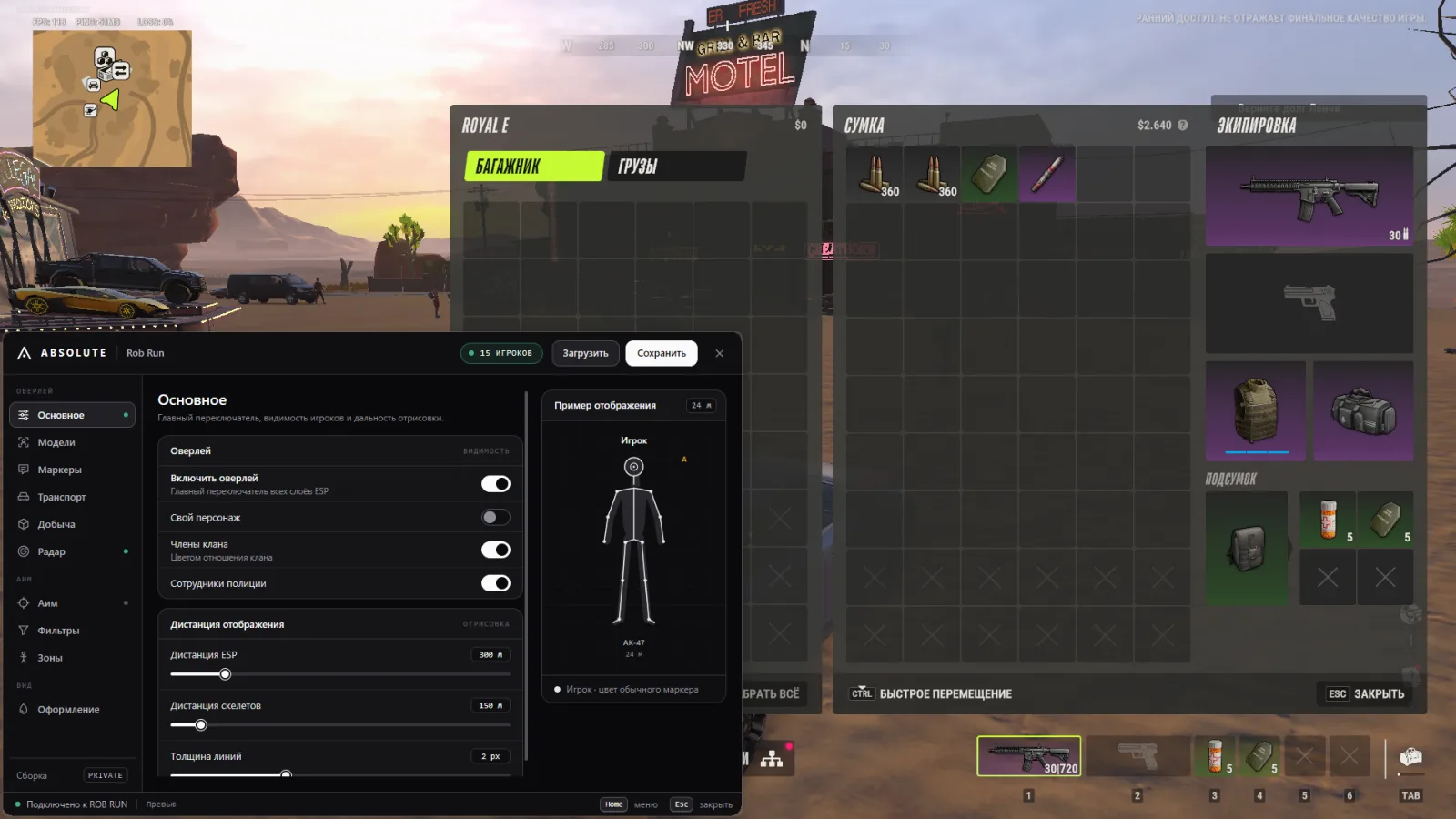
player display in a car/helicopter or other vehicle
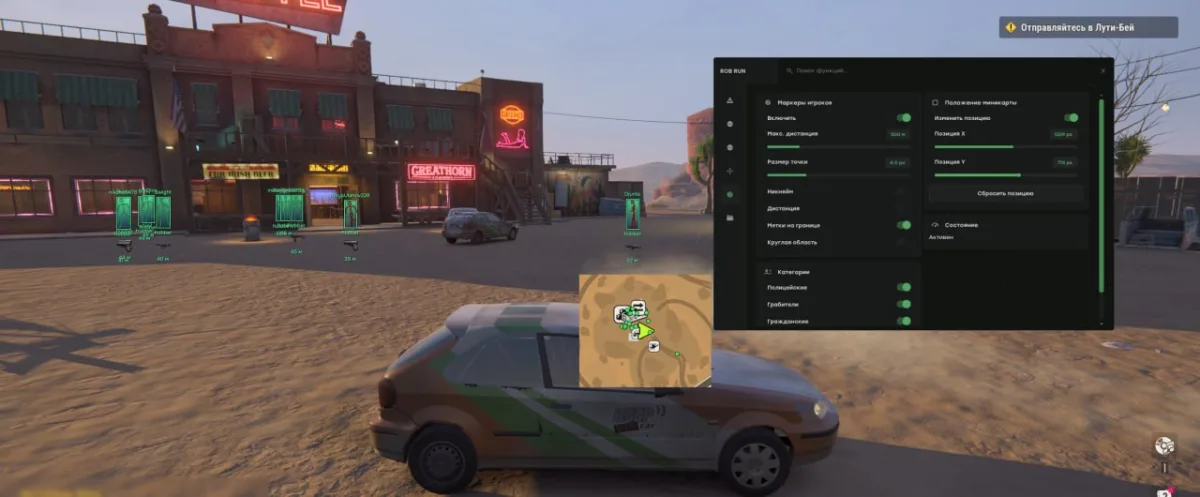
separate colors for regular players/clan members and police officers
display distance and line thickness settings
the ability to show your own character.
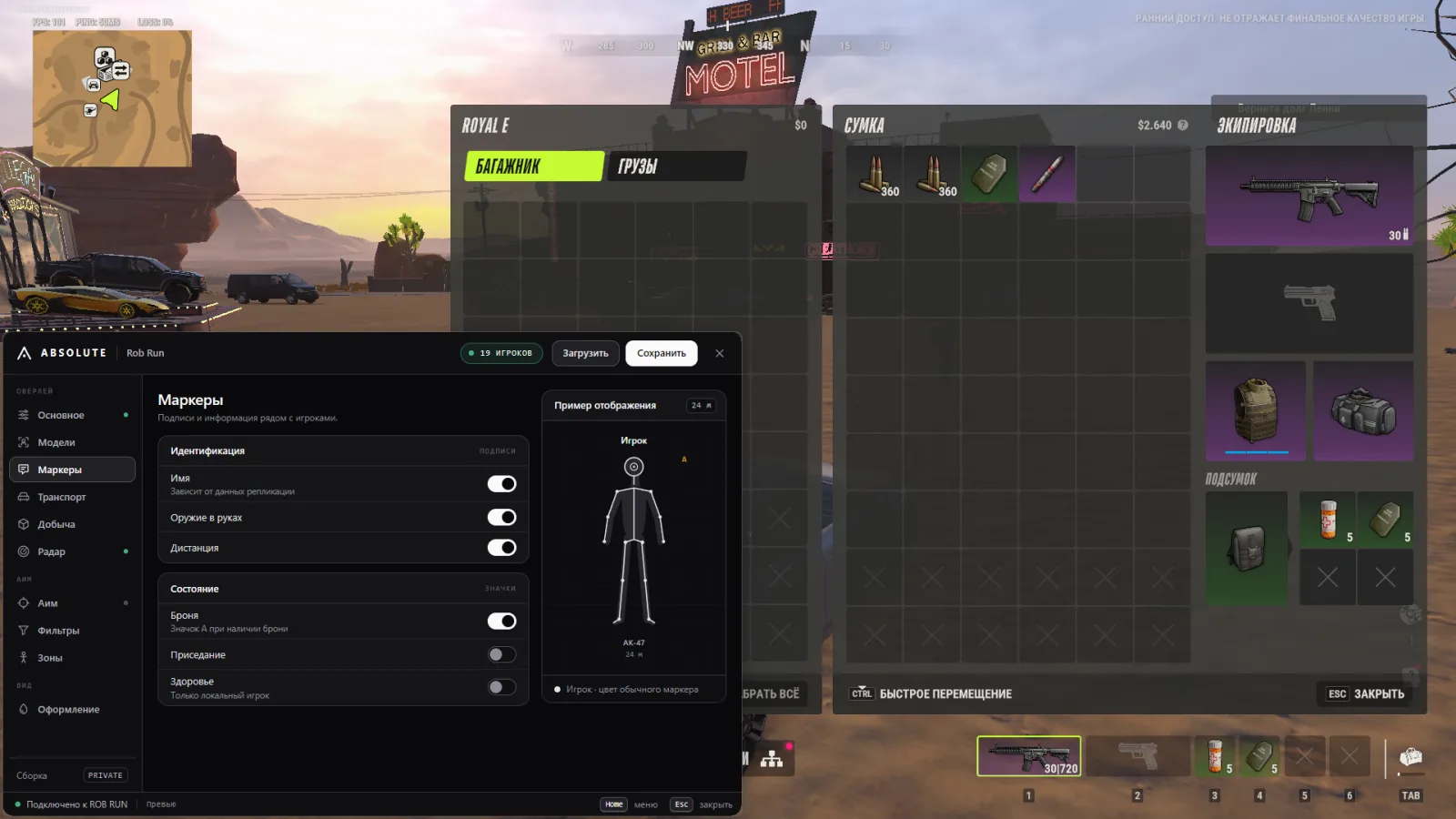
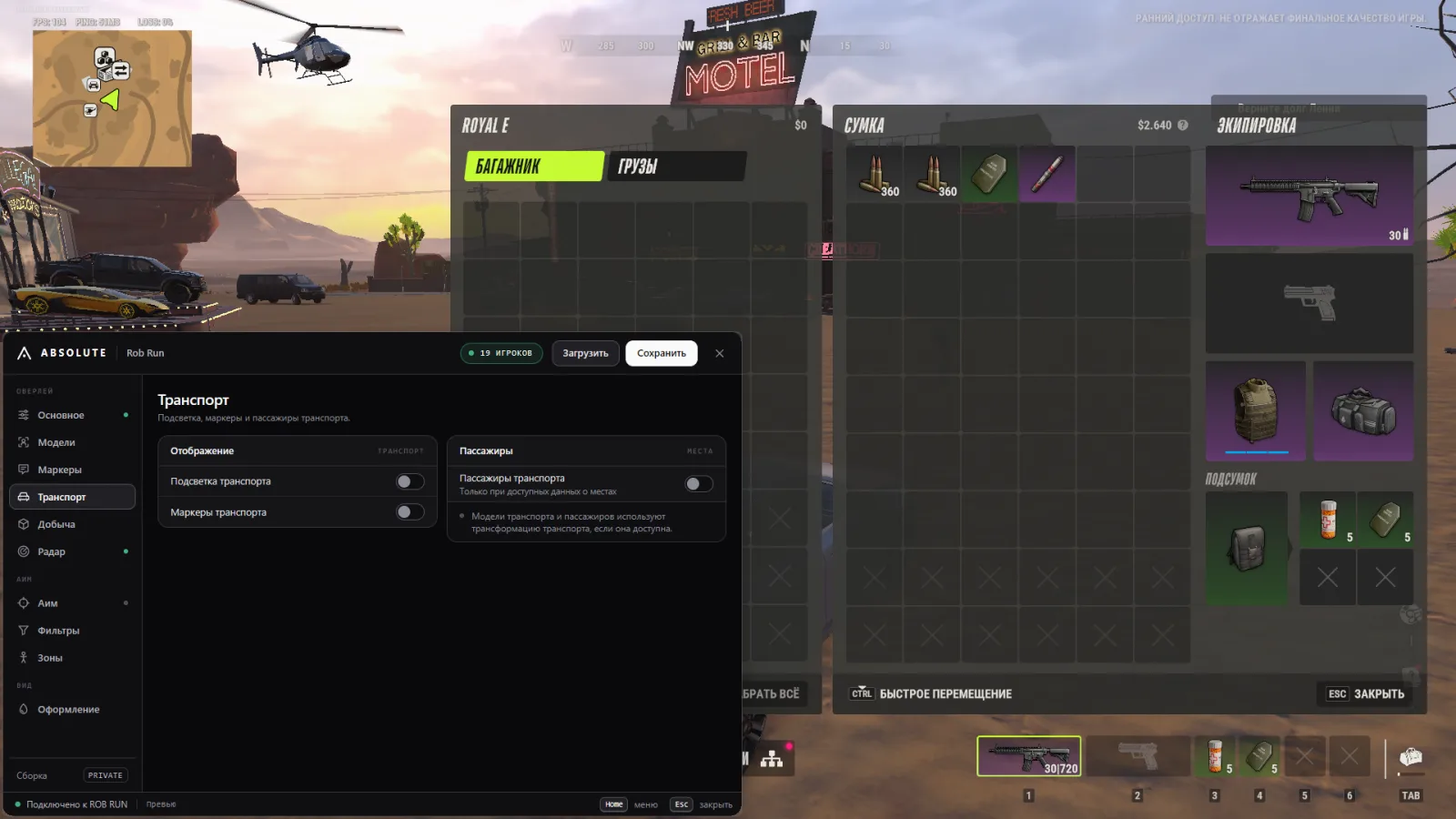
Transport
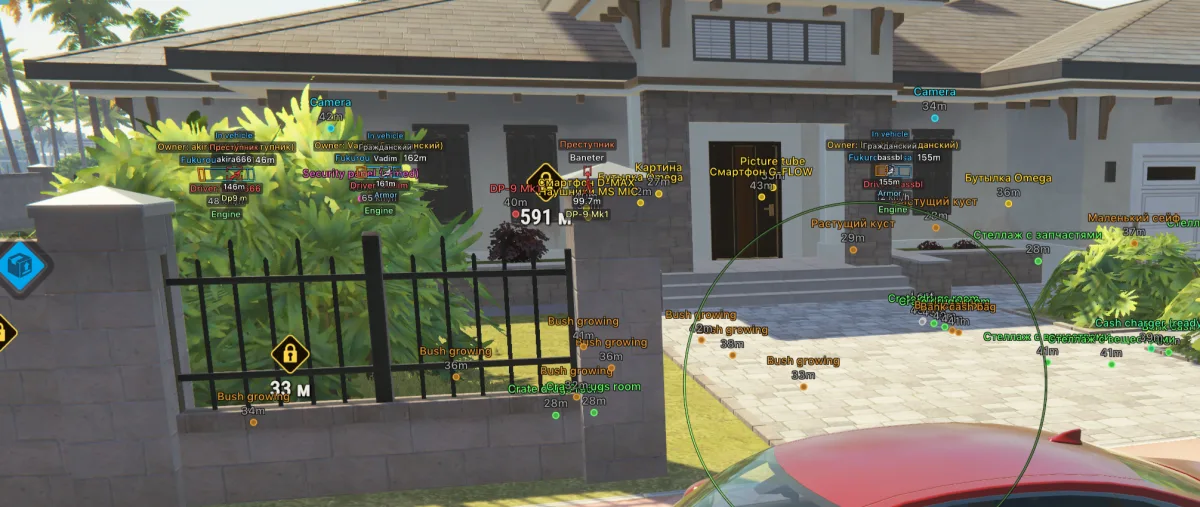
Car and helicopter markers
name and distance to the vehicle
vehicle glow
number of passengers — if this data is available. The vehicle you are in does not receive an extra marker or glow.
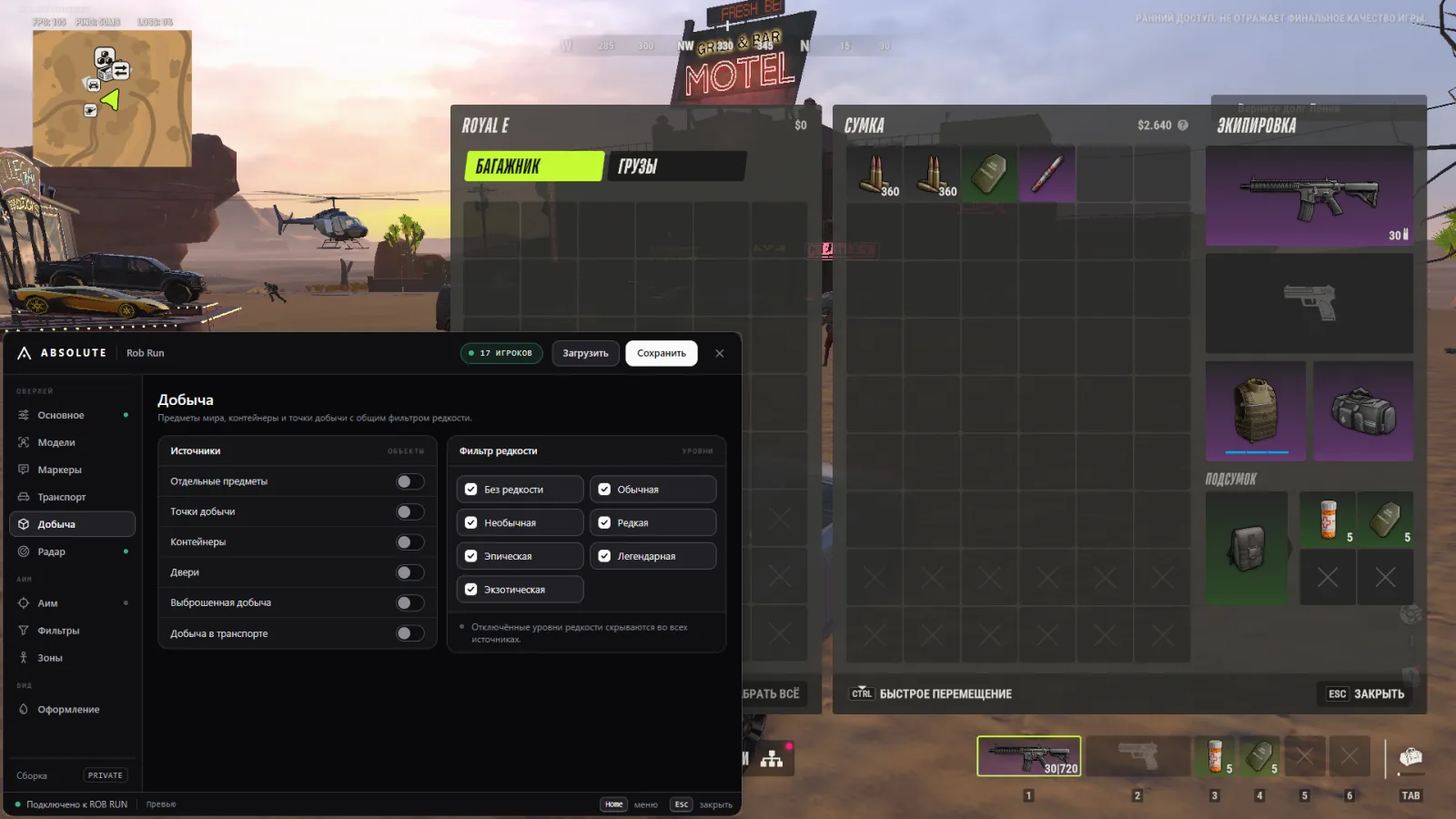
Loot
Items and loot points on the screen
Containers
Doors and their state: open/closed or locked
Discarded items
Loot in vehicles
Clear Russian names for items without unnecessary numbers or suffixes
Item rarity is indicated by color
The ability to hide items of certain rarity levels
General display distance settings.
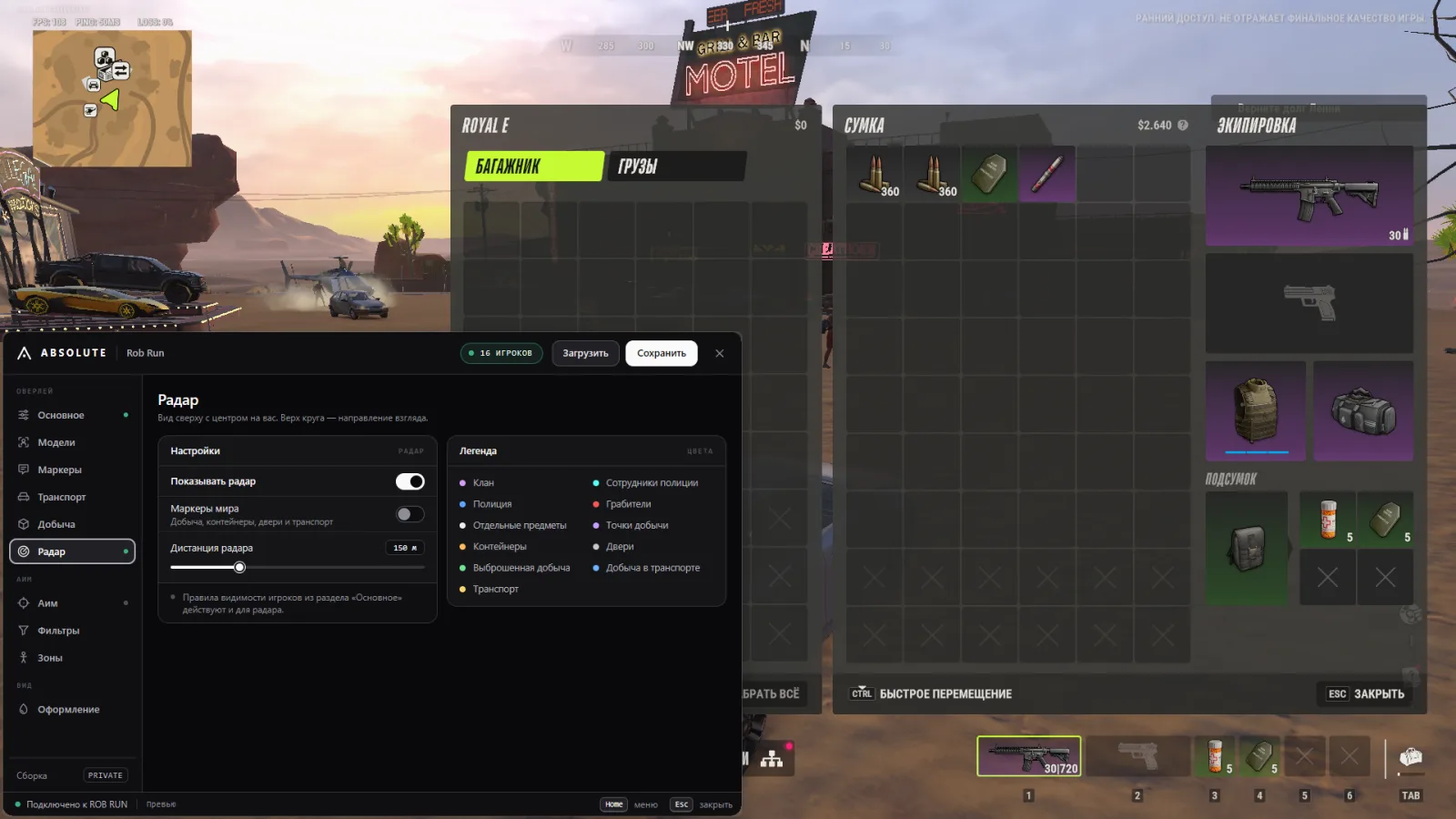
Radar
Players and vehicles on the radar
object and loot markers
radar distance settings
colors by role and relationship to the player
position of objects relative to your character
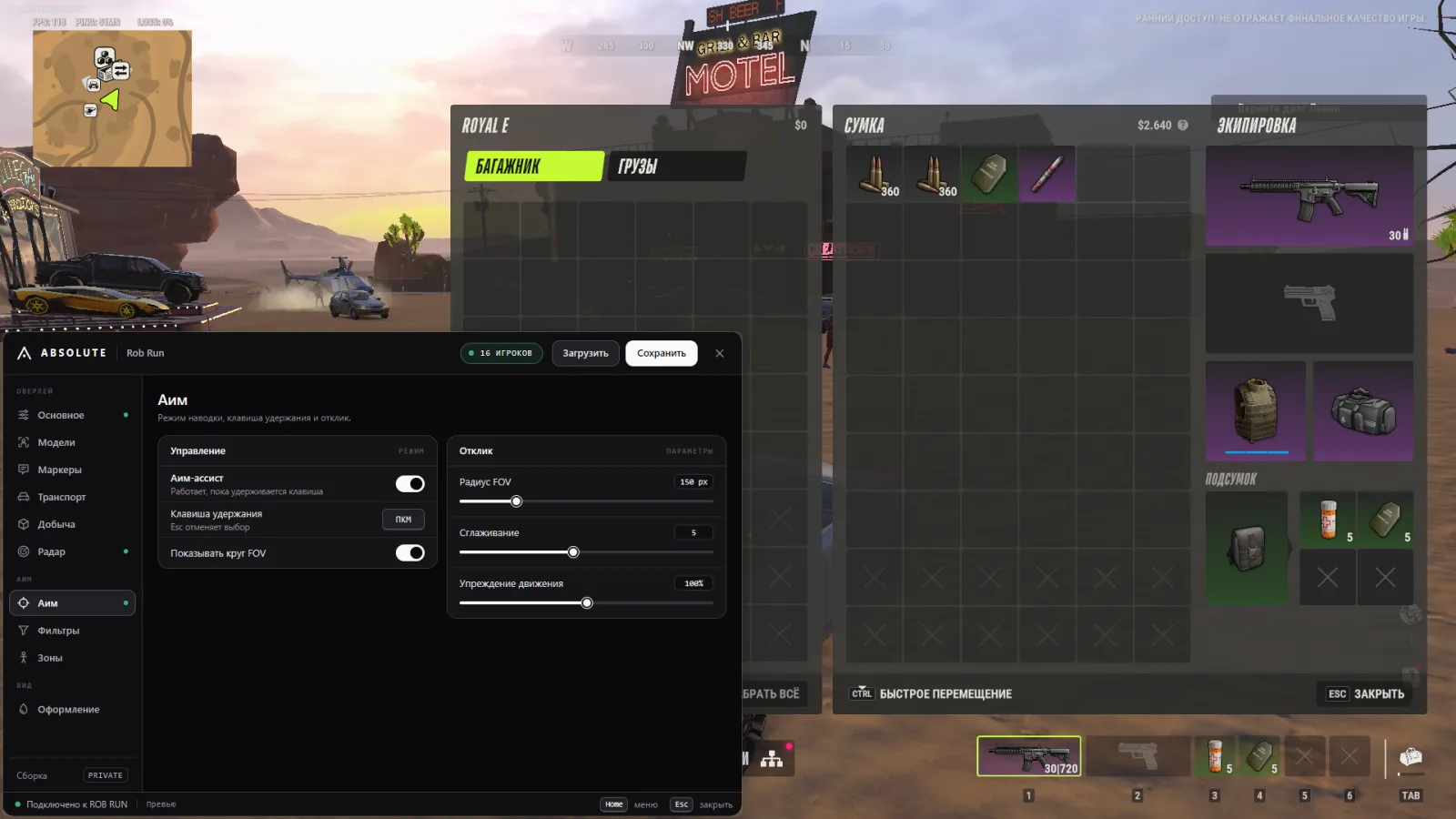
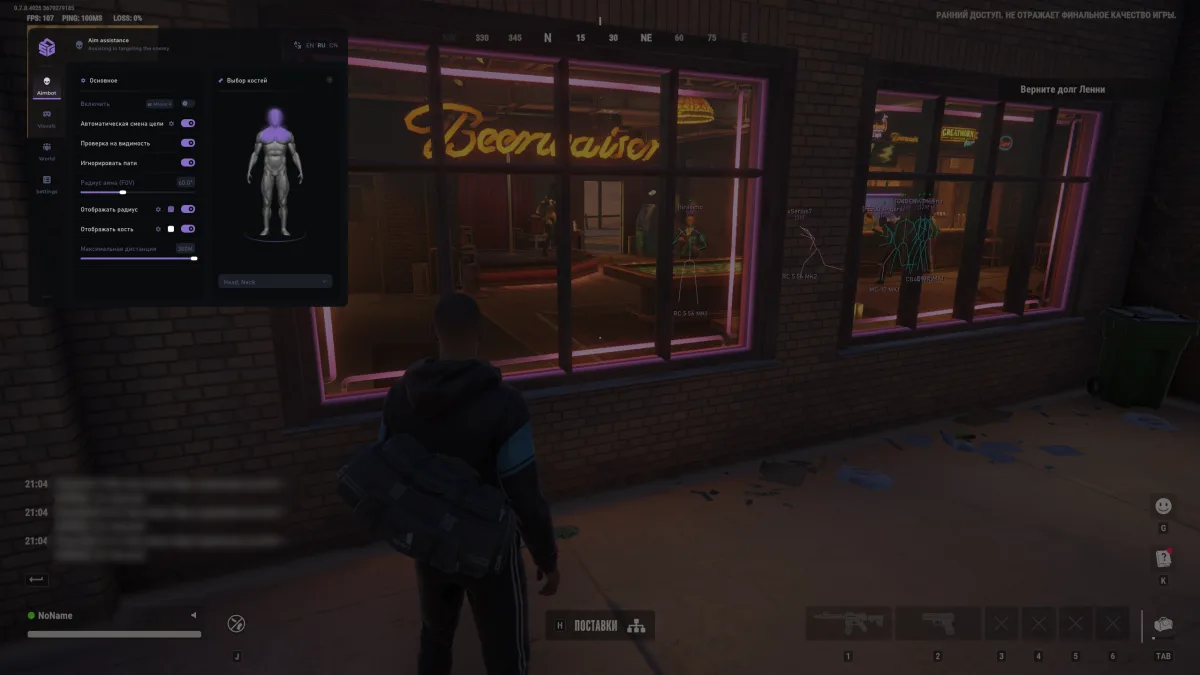
AIM
Automatic pointing when holding down the selected key
Alt is used by default
the key can be changed
Selecting the mouse button instead of the keyboard key
Setting the FOV capture radius
Displaying the FOV circle on the screen
Adjusting anti—aliasing and aiming distance
Anticipating target movement
Hard targeting mode
Priority of the nearest target
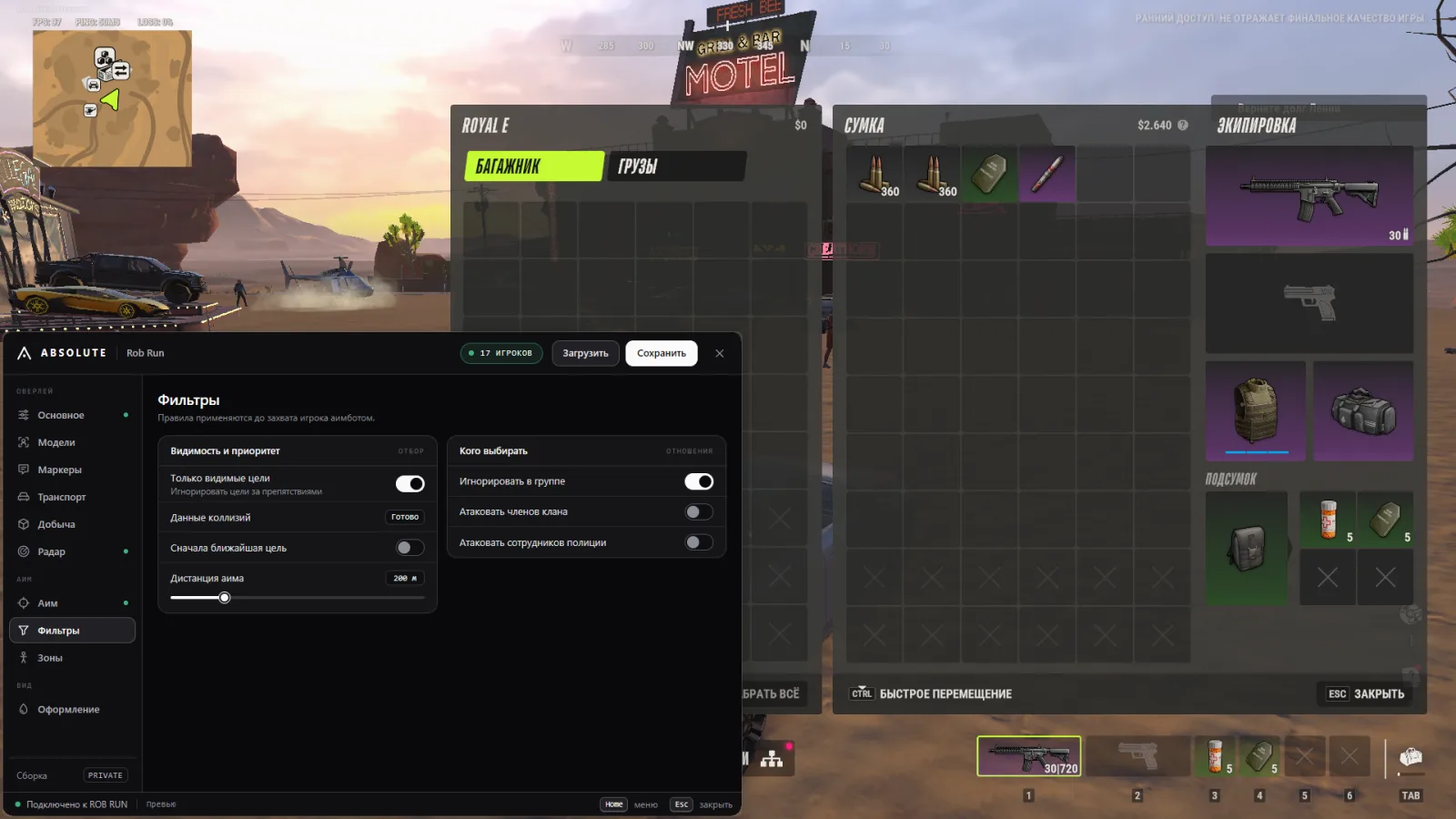
"Visible targets only" - do not aim look at players behind walls and obstacles
Do not select members of your group
Separately allow or prohibit targeting clan members and the police
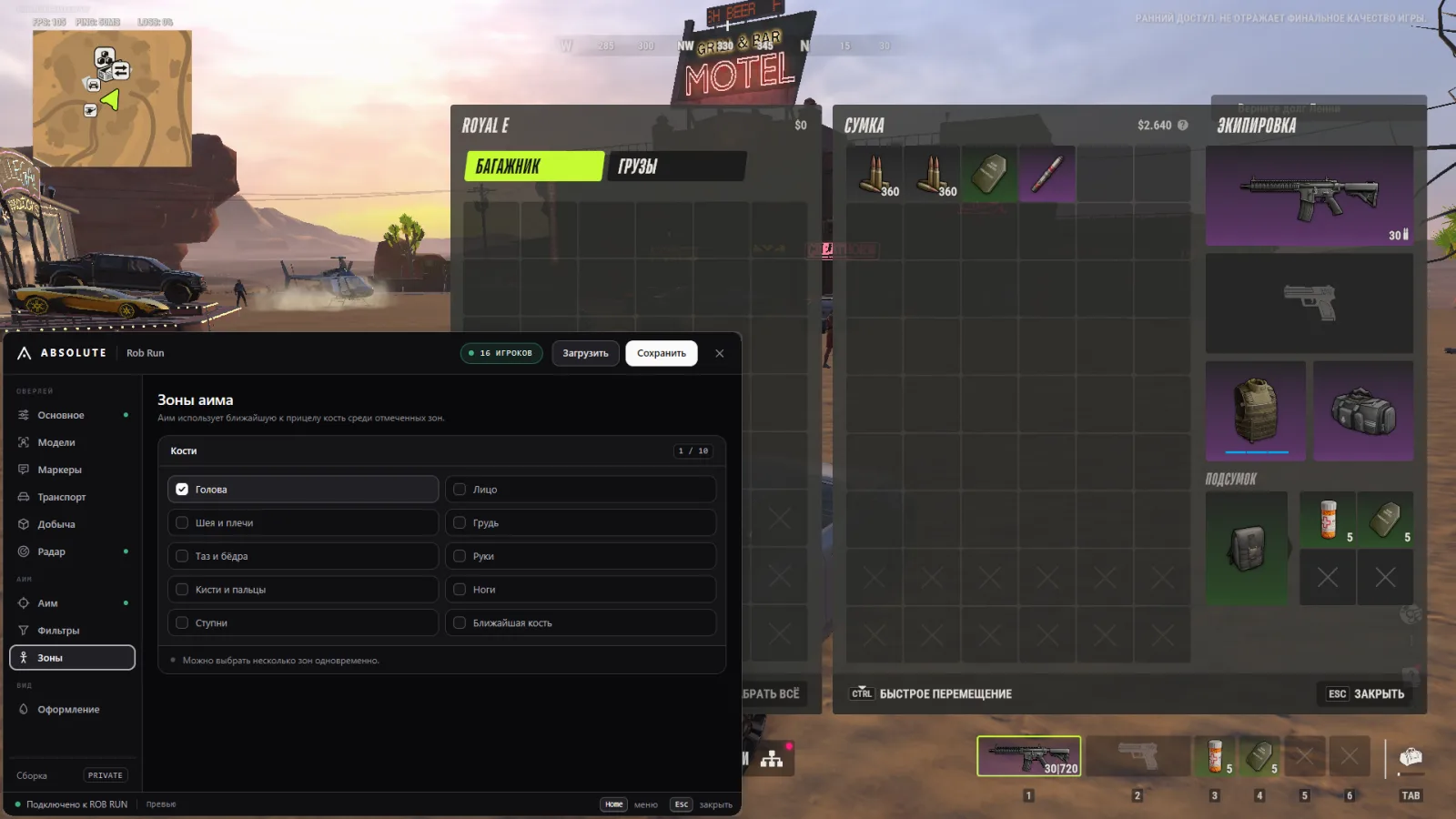
Zone selection: head/face/neck and shoulders/chest/ pelvis/ arms/hands/legs and feet
Select the nearest available zone to the sight
Aiming is automatically paused- while open The menu
Battle Mod
With a single key
it hides all loot and its marker. It removes items/loot points/containers/doors and other unnecessary markers during combat. Players/vehicles and other ESP elements remain on the screen. You can hold the key or turn the mode on and off with a single press. By default
the B key is used; the key can be changed.
APPEARANCE AND MANAGEMENT
Russian language in the menu and ESP
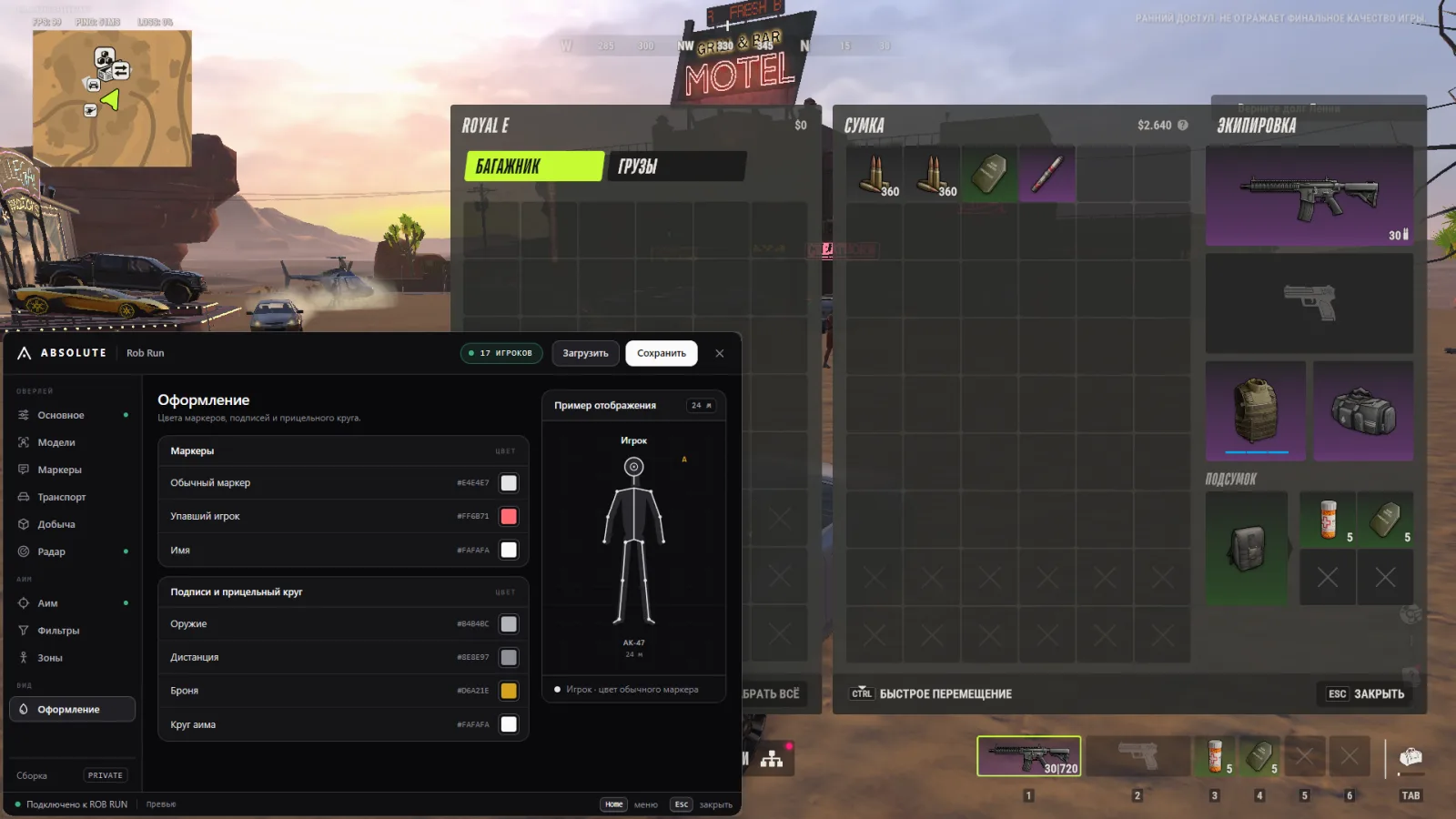
setting player/marker/loot/vehicle colors and FOV
a character example in the menu shows the result of the settings
HOME opens and closes the menu
Esc closes the menu or cancels the selection
the settings are saved automatically
the “Save” button saves them immediately
the “Load” button restores the saved configuration.
The description will appear later.
SystemWindows 10 — all bildsWindows 11 — all bilds
ProcessorIntel and AMD
Graphics cardNVIDIA and AMD
Window modeWindowed and borderless
Built-in spooferNo
USB flash driveNot required
There are no reviews of this cheat yet.
Bought it and gave it a try? Tell us how it works — it will help others.
Excluded. We carefully check each product, we mentioned this on the first screen of the site.
We will apologize, refund your money, replace the product for free and give you some other cheat codes to boot. But let us repeat – this option is out of the question.
Of course! We provide discounts to regular customers or wholesale buyers on an individual basis.
Yes, the referral program is in development. We will roll out the news as soon as we implement it!
Yes. The high quality of our cheats and our 10 years of experience in development will allow you to feel absolutely calm. We are constantly working: bypassing anti-cheat, improving our software and competently using the insights we receive. Whatever new protection game developers come up with, we will always find an antidote.
Yes, of course! Our range is dynamic. Cheats for Warface, BloodHunt, CS:GO, DayZ, PUBG are some of our few offers. You can also contact support with a specific request, and perhaps we will be able to help you
1. Where can I find the purchased cheat?
Immediately after payment, you will get access to the product in two ways:
-On the page after payment, you will receive a key, instructions, and a link.
-A letter with activation data will be sent to your email (check the Spam folder if you do not see the letter).
2. What's inside?
Each cheat includes three key elements:
Key (activation key):
Examples of formats:
XXX-XXX-XXX or okfds85u34sdkofsdkf.
This is your unique code for running the cheat.
Loader (loader):
Download link for the program that injects the cheat into the game.
Files are checked for viruses - temporarily disable your antivirus during installation.
Manual (instructions).
3. How to activate the cheat?
Download Loader from the email or your personal account.
Run it as administrator.
Enter the Key in the appropriate field.
Follow the steps from Manual.
4. If something went wrong
The letter didn't arrive?
Wait 5-10 minutes → check "Spam" → if not, write to support indicating the email you entered when paying.
The key doesn't work?
Make sure you copied it without spaces. If the problem persists, send a screenshot of the error in the chat.
Loader is blocked?
Add it to the antivirus/firewall exceptions (instructions are in Manual).
5. Security reminder
Do not share the Key and Loader with anyone - this will lead to your license being blocked.
For RAGE cheats, always use the Spoofer from the kit to protect your hardware from being banned.
1. Disabling system protection
Before using cheats, you must eliminate all software conflicts:








%22%3E%3Crect x=%222.5%22 y=%222.5%22 width=%228.6%22 height=%228.6%22 rx=%221.4%22/%3E%3Crect x=%2212.9%22 y=%222.5%22 width=%228.6%22 height=%228.6%22 rx=%221.4%22/%3E%3Crect x=%222.5%22 y=%2212.9%22 width=%228.6%22 height=%228.6%22 rx=%221.4%22/%3E%3Crect x=%2212.9%22 y=%2212.9%22 width=%228.6%22 height=%228.6%22 rx=%221.4%22/%3E%3C/g%3E%3Cdefs%3E%3ClinearGradient id=%22g%22 x1=%221%22 y1=%2212%22 x2=%2223%22 y2=%2212%22 gradientUnits=%22userSpaceOnUse%22%3E%3Cstop stop-color=%22%238468FF%22/%3E%3Cstop offset=%221%22 stop-color=%22%23603DFA%22/%3E%3C/linearGradient%3E%3C/defs%3E%3C/svg%3E) System
Windows 10 — all bilds
Windows 11 — all bilds
%22%3E%3Cpath fill-rule=%22evenodd%22 clip-rule=%22evenodd%22 d=%22M7.5 4.6H16.5C18.1 4.6 19.4 5.9 19.4 7.5V16.5C19.4 18.1 18.1 19.4 16.5 19.4H7.5C5.9 19.4 4.6 18.1 4.6 16.5V7.5C4.6 5.9 5.9 4.6 7.5 4.6ZM9.6 8H14.4C15.3 8 16 8.7 16 9.6V14.4C16 15.3 15.3 16 14.4 16H9.6C8.7 16 8 15.3 8 14.4V9.6C8 8.7 8.7 8 9.6 8ZM10.6 9.6C10.05 9.6 9.6 10.05 9.6 10.6V13.4C9.6 13.95 10.05 14.4 10.6 14.4H13.4C13.95 14.4 14.4 13.95 14.4 13.4V10.6C14.4 10.05 13.95 9.6 13.4 9.6H10.6Z%22/%3E%3Crect x=%227.9%22 y=%221.6%22 width=%221.7%22 height=%223.6%22 rx=%220.85%22/%3E%3Crect x=%2211.15%22 y=%221.6%22 width=%221.7%22 height=%223.6%22 rx=%220.85%22/%3E%3Crect x=%2214.4%22 y=%221.6%22 width=%221.7%22 height=%223.6%22 rx=%220.85%22/%3E%3Crect x=%227.9%22 y=%2218.8%22 width=%221.7%22 height=%223.6%22 rx=%220.85%22/%3E%3Crect x=%2211.15%22 y=%2218.8%22 width=%221.7%22 height=%223.6%22 rx=%220.85%22/%3E%3Crect x=%2214.4%22 y=%2218.8%22 width=%221.7%22 height=%223.6%22 rx=%220.85%22/%3E%3Crect x=%221.6%22 y=%227.9%22 width=%223.6%22 height=%221.7%22 rx=%220.85%22/%3E%3Crect x=%221.6%22 y=%2211.15%22 width=%223.6%22 height=%221.7%22 rx=%220.85%22/%3E%3Crect x=%221.6%22 y=%2214.4%22 width=%223.6%22 height=%221.7%22 rx=%220.85%22/%3E%3Crect x=%2218.8%22 y=%227.9%22 width=%223.6%22 height=%221.7%22 rx=%220.85%22/%3E%3Crect x=%2218.8%22 y=%2211.15%22 width=%223.6%22 height=%221.7%22 rx=%220.85%22/%3E%3Crect x=%2218.8%22 y=%2214.4%22 width=%223.6%22 height=%221.7%22 rx=%220.85%22/%3E%3C/g%3E%3Cdefs%3E%3ClinearGradient id=%22g%22 x1=%221%22 y1=%2212%22 x2=%2223%22 y2=%2212%22 gradientUnits=%22userSpaceOnUse%22%3E%3Cstop stop-color=%22%238468FF%22/%3E%3Cstop offset=%221%22 stop-color=%22%23603DFA%22/%3E%3C/linearGradient%3E%3C/defs%3E%3C/svg%3E) Processor
Intel and AMD
%22%3E%3Crect x=%221.4%22 y=%224.2%22 width=%221.8%22 height=%2215.4%22 rx=%220.9%22/%3E%3Cpath fill-rule=%22evenodd%22 clip-rule=%22evenodd%22 d=%22M6.3 5.6H20.4C21.6 5.6 22.6 6.6 22.6 7.8V14.6C22.6 15.8 21.6 16.8 20.4 16.8H6.3C5.1 16.8 4.1 15.8 4.1 14.6V7.8C4.1 6.6 5.1 5.6 6.3 5.6ZM9.6 8.1C8 8.1 6.7 9.5 6.7 11.2C6.7 12.9 8 14.3 9.6 14.3C11.2 14.3 12.5 12.9 12.5 11.2C12.5 9.5 11.2 8.1 9.6 8.1ZM9.6 10.1C10.2 10.1 10.7 10.6 10.7 11.2C10.7 11.8 10.2 12.3 9.6 12.3C9 12.3 8.5 11.8 8.5 11.2C8.5 10.6 9 10.1 9.6 10.1ZM17.1 8.1C15.5 8.1 14.2 9.5 14.2 11.2C14.2 12.9 15.5 14.3 17.1 14.3C18.7 14.3 20 12.9 20 11.2C20 9.5 18.7 8.1 17.1 8.1ZM17.1 10.1C17.7 10.1 18.2 10.6 18.2 11.2C18.2 11.8 17.7 12.3 17.1 12.3C16.5 12.3 16 11.8 16 11.2C16 10.6 16.5 10.1 17.1 10.1Z%22/%3E%3Crect x=%227.4%22 y=%2217.6%22 width=%229.6%22 height=%222%22 rx=%220.6%22/%3E%3C/g%3E%3Cdefs%3E%3ClinearGradient id=%22g%22 x1=%221%22 y1=%2212%22 x2=%2223%22 y2=%2212%22 gradientUnits=%22userSpaceOnUse%22%3E%3Cstop stop-color=%22%238468FF%22/%3E%3Cstop offset=%221%22 stop-color=%22%23603DFA%22/%3E%3C/linearGradient%3E%3C/defs%3E%3C/svg%3E) Graphics card
NVIDIA and AMD
%22%3E%3Cpath fill-rule=%22evenodd%22 clip-rule=%22evenodd%22 d=%22M4.4 2.8H19.6C20.9 2.8 22 3.9 22 5.2V14.6C22 15.9 20.9 17 19.6 17H4.4C3.1 17 2 15.9 2 14.6V5.2C2 3.9 3.1 2.8 4.4 2.8ZM7.2 5.8C6.4 5.8 5.8 6.4 5.8 7.2V12.6C5.8 13.4 6.4 14 7.2 14H16.8C17.6 14 18.2 13.4 18.2 12.6V7.2C18.2 6.4 17.6 5.8 16.8 5.8H7.2ZM7.6 8.6H16.4V11.9C16.4 12.1 16.25 12.25 16.05 12.25H7.95C7.75 12.25 7.6 12.1 7.6 11.9V8.6Z%22/%3E%3Crect x=%2210.6%22 y=%2216.4%22 width=%222.8%22 height=%223.4%22 rx=%220.4%22/%3E%3Crect x=%227%22 y=%2219.4%22 width=%2210%22 height=%221.9%22 rx=%220.95%22/%3E%3C/g%3E%3Cdefs%3E%3ClinearGradient id=%22g%22 x1=%221%22 y1=%2212%22 x2=%2223%22 y2=%2212%22 gradientUnits=%22userSpaceOnUse%22%3E%3Cstop stop-color=%22%238468FF%22/%3E%3Cstop offset=%221%22 stop-color=%22%23603DFA%22/%3E%3C/linearGradient%3E%3C/defs%3E%3C/svg%3E) Window mode
Windowed and borderless
%22/%3E%3Cdefs%3E%3ClinearGradient id=%22g%22 x1=%221%22 y1=%2212%22 x2=%2223%22 y2=%2212%22 gradientUnits=%22userSpaceOnUse%22%3E%3Cstop stop-color=%22%238468FF%22/%3E%3Cstop offset=%221%22 stop-color=%22%23603DFA%22/%3E%3C/linearGradient%3E%3C/defs%3E%3C/svg%3E) Built-in spoofer
No
%22%3E%3Cpath fill-rule=%22evenodd%22 clip-rule=%22evenodd%22 d=%22M4.2 6.6H13C14.3 6.6 15.4 7.7 15.4 9V15C15.4 16.3 14.3 17.4 13 17.4H4.2C2.9 17.4 1.8 16.3 1.8 15V9C1.8 7.7 2.9 6.6 4.2 6.6ZM5.3 10.75C4.6 10.75 4.05 11.3 4.05 12C4.05 12.7 4.6 13.25 5.3 13.25C6 13.25 6.55 12.7 6.55 12C6.55 11.3 6 10.75 5.3 10.75Z%22/%3E%3Cpath fill-rule=%22evenodd%22 clip-rule=%22evenodd%22 d=%22M16.6 8.4H21.1C21.65 8.4 22.1 8.85 22.1 9.4V14.6C22.1 15.15 21.65 15.6 21.1 15.6H16.6V8.4ZM18.4 10.2V11.4H20V10.2H18.4ZM18.4 12.6V13.8H20V12.6H18.4Z%22/%3E%3C/g%3E%3Cdefs%3E%3ClinearGradient id=%22g%22 x1=%221%22 y1=%2212%22 x2=%2223%22 y2=%2212%22 gradientUnits=%22userSpaceOnUse%22%3E%3Cstop stop-color=%22%238468FF%22/%3E%3Cstop offset=%221%22 stop-color=%22%23603DFA%22/%3E%3C/linearGradient%3E%3C/defs%3E%3C/svg%3E) USB flash drive
Not required


%22/%3E%3Cpath d=%22M138.98 0L138.98 -2.89H138.98V0ZM277.96 138.98H280.85V138.98H277.96ZM138.98 277.96V280.85H138.98L138.98 277.96ZM9.39 271.16L9.74 274.03H9.74L9.39 271.16ZM1.47 262.3L-1.34 261.62L-1.34 261.62L1.47 262.3ZM14.56 208.18L11.76 207.5H11.76L14.56 208.18ZM0 138.98H-2.89V138.98H0ZM14.66 201.17L17.24 199.88L14.66 201.17ZM64.84 264.21L65.2 267.08L64.84 264.21ZM138.98 0L138.98 2.89C214.15 2.89 275.08 63.82 275.08 138.98H277.96H280.85C280.85 60.63 217.34 -2.89 138.98 -2.89L138.98 0ZM277.96 138.98H275.08C275.08 214.14 214.15 275.08 138.98 275.08L138.98 277.96L138.98 280.85C217.34 280.85 280.85 217.33 280.85 138.98H277.96ZM138.98 277.96V275.08C120.58 275.08 103.04 271.43 87.04 264.81L85.94 267.48L84.83 270.15C101.52 277.05 119.81 280.85 138.98 280.85V277.96ZM64.84 264.21L64.48 261.35L9.03 268.3L9.39 271.16L9.74 274.03L65.2 267.08L64.84 264.21ZM9.39 271.16L9.03 268.3C6.02 268.67 3.57 265.93 4.28 262.98L1.47 262.3L-1.34 261.62C-3 268.5 2.73 274.91 9.74 274.03L9.39 271.16ZM1.47 262.3L4.28 262.98L17.37 208.85L14.56 208.18L11.76 207.5L-1.34 261.62L1.47 262.3ZM14.66 201.17L17.24 199.88C8.06 181.56 2.89 160.88 2.89 138.98H0H-2.89C-2.89 161.8 2.5 183.36 12.08 202.47L14.66 201.17ZM0 138.98H2.89C2.89 63.82 63.82 2.89 138.98 2.89V0V-2.89C60.63 -2.89 -2.89 60.63 -2.89 138.98H0ZM14.56 208.18L17.37 208.85C17.64 207.73 17.99 206.28 18.1 204.81C18.21 203.31 18.09 201.57 17.24 199.88L14.66 201.17L12.08 202.47C12.29 202.9 12.4 203.5 12.34 204.39C12.27 205.32 12.04 206.31 11.76 207.5L14.56 208.18ZM85.94 267.48L87.04 264.81C80.01 261.9 72.27 260.37 64.48 261.35L64.84 264.21L65.2 267.08C71.77 266.25 78.49 267.53 84.83 270.15L85.94 267.48Z%22 fill=%22white%22 style=%22mix-blend-mode:soft-light%22 mask=%22url(%23path-1-inside-1_0_319)%22/%3E%3C/g%3E%3Cdefs%3E%3ClinearGradient id=%22paint0_linear_0_319%22 x1=%22-22.4%22 y1=%22173.9%22 x2=%22300.4%22 y2=%22104%22 gradientUnits=%22userSpaceOnUse%22%3E%3Cstop stop-color=%22%23373ADA%22/%3E%3Cstop offset=%221%22 stop-color=%22%23A2A9FB%22/%3E%3C/linearGradient%3E%3C/defs%3E%3C/svg%3E)